変更イベント ツールの列表示設定はどのように機能しますか?
答え
変更イベント ツールの [設定を構成する] ページにある [列表示] チェックボックスは、変更イベント ツールの [詳細] タブで使用できる列を制御します。ボックス内のチェックマークは、設定が有効であり、その設定に関連付けられた列がオンになっていることを示します。1つ (または両方) の設定を無効にするには、ボックスからチェックマークを外します。
新しい Procore プロジェクトの「列表示」のデフォルト設定は次のとおりです。
- 収益の概算見積、最新価格、最新コスト、過不足額列の表示がオンになります。これらのオプションを使用すると、[収益の概算見積] 列が表示されるため、プロジェクトの潜在的な収益をより明確に把握できます。また、プロジェクトの最新の価格とコスト (最新の価格/最新のコスト) を監視することもできます。さらに、過不足額列を使用して、変更イベント内の最新価格 (マークアップを含む) と最新コストの差を測定することで、予測される節約と損失をより適切に管理できます。この設定に関する重要な情報については、 「設定の構成: イベントの変更」を参照してください。
- [単位]、[収益数量]、[収益単位コスト]、[ROM 単位数量]、および [ROM 単位コスト] 列の表示はオフです。この設定により、ツールで単位ベースの列を有効にすることができます。この設定の詳細については、「変更イベント ツールで単位ベースの列を有効/無効にする」を参照してください。
ツールの設定を変更した後は、必ず「保存」をクリックしてください。手順については、 「設定の構成: イベントの変更」を参照してください。
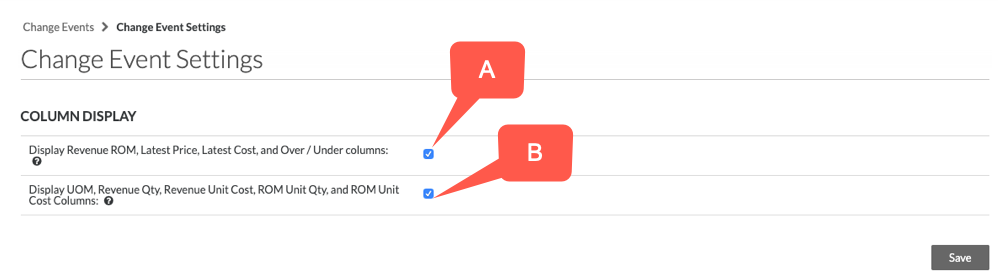
以下の表は、各設定の組み合わせで使用できる列の詳細を示しています。
| カラム | A&B有効 | A & B 無効 | A のみ有効 | Bのみ有効 |
|---|---|---|---|---|
| サブプロジェクト |  1 1 |
1 |
1 |
1 |
| 費用コード | |
|
|
|
| 費用タイプ | |
|
|
|
| 説明 | |
|
|
|
| 建材業者 | |
|
|
|
| 契約 | |
|
|
|
| 測定単位 | |
|
||
| 生産数量 | 2 |
2 |
2 |
2 |
| 生産測定単位 | 2 |
2 |
2 |
2 |
| 収益: ユニット数量 | |
|||
| 収益: 単価 | |
|||
| 収益: ROM | |
|
||
| 収益: 元請契約の変更指示案 | |
|
|
|
| 収益: 最新価格 | |
|
||
| コスト: 単位数量 | |
|
||
| コスト: 単価 | |
|
||
| コスト:ROM | |
|
|
|
| コスト: 見積依頼 | |
|
|
|
| コスト: 委託契約・発注 | |
|
|
|
| コスト: 諸費用 | 3 |
3 |
3 |
3 |
| コスト: 最新のコスト | |
|
|
|
| 過不足 | |
|
||
|
|
|
|
|
|
1 [サブプロジェクト] 列を別々に有効/無効にする必要があります。ガイドラインについては、「作業分解構成図のプロジェクトでサブプロジェクトを有効にする」を参照してください。
2 [生産量] 列と [生産単位] 列を別々に有効にする必要があります。ガイドラインについては、「プロジェクト会計の労働生産性費用機能を有効にする」を参照してください。
3 「諸費用」コスト列を個別に有効にする必要があります。手順については、 「変更イベントの諸費用を追跡するにはどうすればよいですか?」を参照してください。
If you would like to learn more about Procore's change events management software and how it can help your business, please visit our construction change order product page  .
.
.