日報を再度開く
目的
自分またはチームがその日のデータを変更できるように、その日の日報を再度開くこと。
考慮すべきこと
- 必要なユーザー権限:
- プロジェクトの日報ツールの「管理者」権限。
- 前提条件:
- 追加情報:
- 再開後、エントリーは追加、変更、削除できるようになります。
ステップ
日報は、リスト ビューまたはカレンダー ビューで再度開くことができます。
リストビューで一日を再度開く
- プロジェクトの日報ツールに移動します。
- 再開する日に移動します。
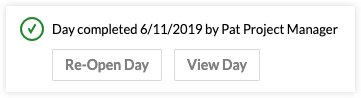
- その日の日報の上にあるバナーで [再開日] をクリックします。

カレンダービューで一日を再度開く
- プロジェクトの日報ツールに移動します。
- [カレンダー] をクリックしてカレンダー ビューに移動します。
- 再開したいカレンダーの日付をクリックします。
- [ 再開日] をクリックします。
If you would like to learn more about Procore's daily log management software and how it can help your business, please visit our construction daily log reporting software product page  .
.
.