メールをフィルタリングするタグを作成する
目的
タグを作成して、プロジェクトの電子メール ツールでメッセージをフィルタリングします。
背景
電子メール ツールを使用すると、ユーザーは電子メール ツールに保存されているメッセージに適用できるタグを作成できます。タグがメールに適用されると、ユーザーは [タグ] メニューで個々のタグをクリックして、そのタグに関連付けられているすべてのメールメッセージを表示できます。
考慮すべきこと
- 必要なユーザー権限:
- プロジェクトの電子メール ツールに対する「管理者」レベルの権限。
ステップ
- プロジェクトの [電子メール ] ツールに移動します。
- [ + タグを作成] をクリックします。
- [ タグ名 ] ボックスに、タグの名前を入力します。
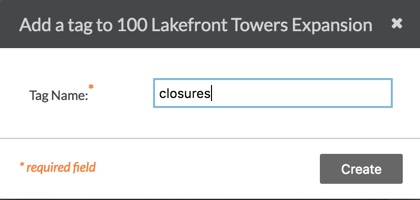
- 「 作成」をクリックします。
以下に示すように、システムは新しいタグを電子メール ツールの [タグ] リストに追加します。

次のステップ
If you would like to learn more about Procore's email management software and how it can help your business, please visit our construction email management software product page  .
.
.