Add Custom Translations to Observation Types
Objective
To add a custom translation to an Observation Type from the company's Admin tool.
Background
Admins can add custom translations for observation types to be used in the project's Observations tool. When users create observations, the translated observation types display based on a project's locale settings or the locale settings for individual users (if enabled). This allows multi-lingual teams to maintain consistency when recording on observations.
Things to Consider
- Required User Permission:
- 'Admin' level permissions on the Company level Admin tool.
- Additional Information:
- The language settings on a user's mobile device may override locale settings in Procore. This may result in a different translation of the same observation type displayed in the user's web application if custom translations have been added for the language used on their mobile device. This will not affect reports created for observations. For more information, see Can I change the language of my Company, Project, or User in Procore?
- Translations can be added to default observation types or custom observation types. See Add Company Level Observation Types.
Steps
- Navigate to the Company level Admin tool.
- Under 'Tool Settings', click Observations.
- Locate the observation type you want to add a translation to.
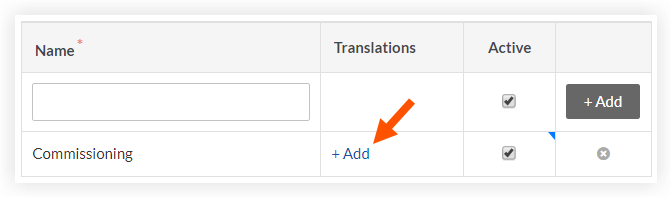
- In the 'Translations' column, click +Add.
- Mark the checkbox next to the languages you want to add translations for.
- Type the translation for each language in the text boxes that appear for the locales you selected.

- Click Save.