Reset the Client Secret for a Service Account
Service Account Deprecation
Traditional Service Accounts were deprecated on December 9, 2021. All traditional service accounts will be sunset on a future date to be announced. As a result of this deprecation, developers of data connection applications that currently use traditional service accounts are required to update their applications to use DMSAs, and customers will be required to install these updated applications before the sunset date. See Deprecation of Traditional Service Accounts and Migrating Data Connection Applications to Use DMSAs for additional information.
Objective
To reset the client secret for a service account using the Company Admin tool.
Background
Services accounts allow you to support integrations that require the Client Credentials grant flow as defined in the IETF OAuth 2.0 Framework Specification. In this scenario, applications need a way to retrieve an OAuth 2.0 access token outside the context of any specific Procore user. OAuth 2.0 provides the Client Credentials grant type for this purpose. A unique client_id and client_secret is generated when a new service account is created. For information on implementing the Client Credentials grant flow in an application, see OAuth 2.0 Using Client Credentials on our Developer Portal.
Things to Consider
- Required User Permission:
- 'Admin' level permissions on the company's Admin tool.
- Access Considerations:
- A new service account consists of:
- client_id. The identifier for the service account.
- client_secret. The secret is a randomly generated code that will be used by the service account. It is only visible to you at the time the account is created. You may want to note the client_secret and then save it to a secure location should you require it in the future for reference.
Important! If for any reason you lose the client_secret, Procore recommends creatng a new service account. - New service accounts are created without permissions ('None') by default. To change these permissions, see Configure Service Account Permissions.
- A new service account consists of:
- Important Company Directory Considerations:
- Once you create a service account, the associated email address must not be changed in the company directory. If you modify the service account email address, the service account will no longer be functional.
- The service account contact cannot be added to more than one company directory (just the one it was created in), or else it will stop working.
Steps
Important
Please note that resetting the client secret will reset all permissions and project memberships for the selected service account.- Navigate to the Company level Admin tool.
- Under 'Company Settings', click Service Accounts.
- Locate the service account you want to reset the client secret for and click View.
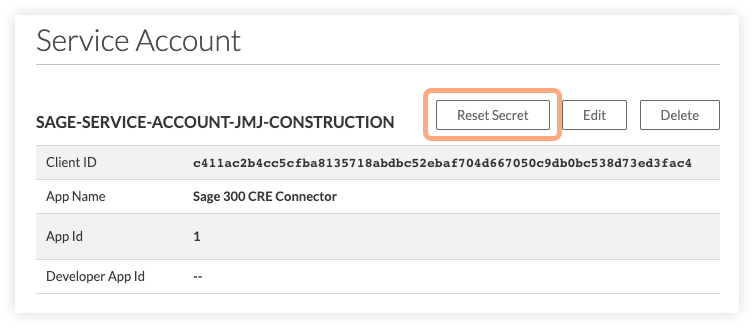
- Click Reset Secret to reset the client secret for the selected service account.
- Click Continue to confirm your action.
