

会社レベルの建機メーカーまたはモデルを編集する
PRIVATE ARTICLE
This page is set to 'Private' and is only visible to members of the PC-Internal group (a.k.a., Procore Employees).
The content on the United States (English) page below is exported as source content when publishing target content on the Australia (English) instance of the Procore Support Site at this link:  Edit a Company Level Equipment Make or Model
Note
The (Legacy) Equipment tool was developed specifically for use by Procore customers in Australia and New Zealand. For documentation, visit the Company Level Equipment page and Project Level Equipment page on the Australia (English) instance of the Procore Support Site.
目的
会社レベルの建機のメーカーやモデルを編集すること。
考慮すべきこと
- 必須ユーザー権限:
- 会社の建機 (レガシー) ツールに対する「管理者」レベルの権限。
- 追加情報:
- メーカーやモデルが編集されると、それらの変更は会社 (レガシー) およびプロジェクト (レガシー) レベルの対応する機器エントリに同期されます。
前提条件
ステップ
- 会社の Equipment (Legacy) ツールに移動します。
- [設定の構成]
 アイコンをクリックします。
 - 「 設定」で、「 構成の作成」をクリックします。
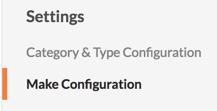
- 希望のメーカーやモデルのフィールドをクリックします。
- 情報を変更します。
注: 編集が完了すると、変更は自動的に保存されます。[ 戻る ] をクリックして、メインの [建機] ページに戻ります。