予算変更の承認
目的
プロジェクトの予算ツールを使用して予算変更を承認すること。
背景
Procore ユーザー アカウントにプロジェクトの予算ツールで必要なユーザー権限が付与されている場合は、予算変更を承認できます。 これを行うには、予算変更ページでステータスを変更するだけです。
考慮すべきこと
- 必要なユーザー権限:
- プロジェクトの予算ツールに対する「管理者」レベルの権限。
又は - 権限テンプレートで「予算変更の作成、編集、削除」のアクセス権限が有効になっている、プロジェクトの予算ツールに対する「読み取り専用」または「標準」レベルの権限。
- プロジェクトの予算ツールに対する「管理者」レベルの権限。
- 追加情報:
- Procore では、会社 (または各プロジェクト チーム) が環境内の予算変更を管理するためのポリシーを策定することをお勧めします。
- 予算の変更は、Procore の会社レベルのワークフロー ツールでサポートされています。
- 制限事項:
- 予算変更では、ゼネコン/クライアント請求書、資金調達請求書、または発注者への請求書は自動入力されません。
- カスタム ワークフローがプロジェクトに適用されている場合、予算変更ステータスを手動で編集することはできません。
- For companies using the
 ERP Integrations tool: Show/Hide
- Only 'Approved' budget changes can be sent to Procore + ERP Integrations.
- Budget changes can be retrieved from Procore + ERP Integrations if they have not yet been synced.
- Budget changes cannot be edited or deleted once synced with the integrated ERP system.
前提条件
ステップ
- プロジェクトの [予算] ツールに移動します。
- [ 予算変更 ] タブをクリックします。
- 承認する予算変更を見つけます。 次に、その [ Budget Change # ] リンクをクリックします。
- 「一般情報」セクションで、[ 編集] をクリックします。
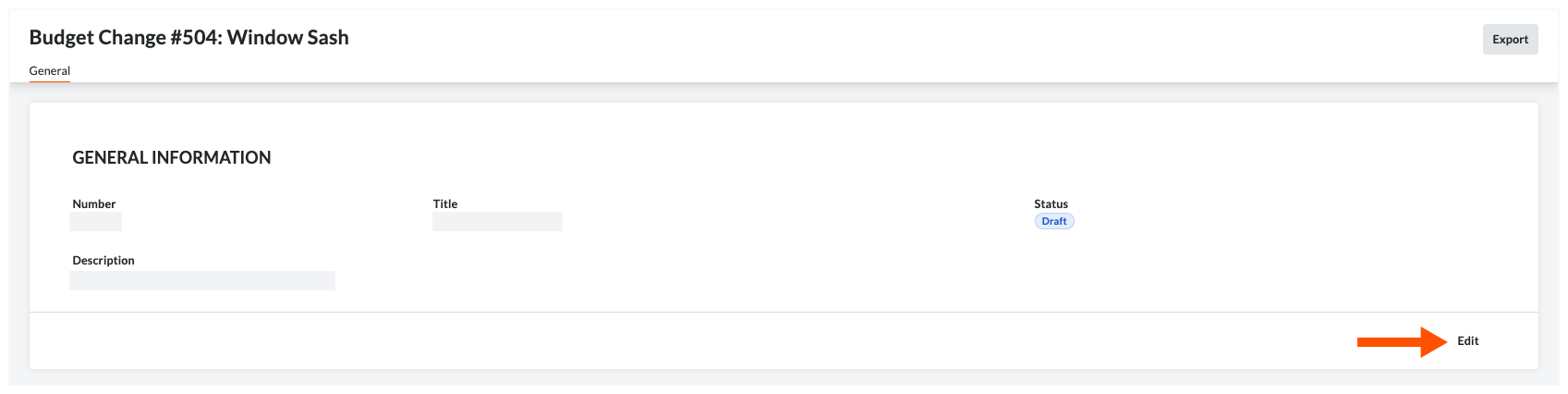
- 予算の変更とすべての調整を確認します。
- 「一般情報」領域で、[ ステータス ] ドロップダウンリストから「承認済み」を選択します。

- [保存する] をクリックします。
関連項目
If you would like to learn more about Procore's budget management software and how it can help your business, please visit our construction budgeting software product page  .
.
.