設定の構成: 未成工事支出金請求書
For Procore Customers in the United States
 When your company applies the 'Owners English' or 'Specialty Contractors English' point-of-view dictionary, you'll see different tool names and term changes in the user interface. Learn how to apply the dictionary options.
- To learn the differences: Show/Hide
目的
請求書管理者として請求書管理ツールの設定を構成すること。
背景
請求書管理者は、チーム メンバーが Procore プロジェクトで請求書を作成する前に、請求書管理ツールの設定を構成する必要があります。
考慮すべきこと
ステップス
- プロジェクトの 請求書管理ツールに移動します。
- [設定の構成] をクリックします
 。
。 - [ 設定] で、オプションを構成します。
既定の請求期間
これらの設定は、ユーザーが 請求書管理ツールを使用して手動請求周期を作成するときに、「請求周期の設定」プロンプトの日付フィールドに入力されます。
ヒント
将来のサイクルの請求周期の作成を簡素化したいとお考えですか?請求書管理者は、既定の請求周期の日付を構成して、「請求周期の設定」プロンプトの [開始日]、[終了日]、および [期日] フィールドの日付を事前設定できます。見る手動請求を作成する 請求書管理ツールの期間. この構成を完了しない場合、事前設定された日付は表示されません。 代わりに、mm/dd/yyyy と表示されます。既定の請求周期設定を構成するには:
- 次の日付を選択します。
- 開始日。既定の開始日である「月の 1 日」をそのまま使用するか、別の日付を選択します。 これにより、プロンプトに「開始」の日付が入力されます。
- 終了日。既定の終了日である「月の 31 日」をそのまま使用するか、別の日付を選択します。これにより、プロンプトに「終了」の日付が入力されます。
- 期日。既定の期日である「その月の 25 日」を受け入れるか、別の日付を選択します。これにより、プロンプトの「期日」フィールドに値が入力されます。

-
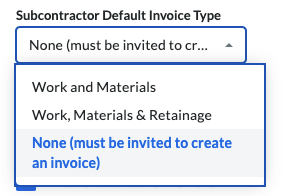
ドロップダウンリストから [下請業者の既定の請求書の種類 ] オプションを選択します。
- 作業と材料。 請求書送付先が作業と材料に対して請求するための請求書を作成できるようにします。
- 仕事、材料、留保金。 請求書送付先が、作業、材料、および保留金の解除に対して請求する請求書を作成できるようにします。
- なし (請求書の作成には招待が必要です)。請求書送付先が「請求書への招待」を送信した後にのみ請求書の作成を許可します。
注
委託契約・発注管理ツールに対する「管理者」レベルの権限を持つユーザーが新しい請求書を作成する場合、「請求書の種類」は常に「作業、材料、保留金」に設定されます。
- [更新] をクリックします。
先取特権の放棄
General Availability in Select Markets (United States)
Procore Pay  is available in the United States. It is designed for General Contractors and Owner-Builders who act as their own General Contractors on a job. Procore Pay extends the Invoice Management functionality in the Procore web application to handle the payment process between general and specialty contractors.
これらの設定は Procore ペイでのみ使用できます。手順については、以下を参照してください。
電子メール
これらの設定を使用して、請求書管理ツールの電子メール メッセージを調整します。
電子メール設定を構成するには:
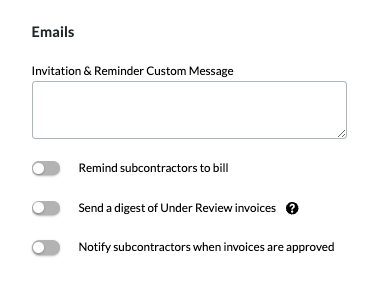
- [招待とリマインダーのカスタム メッセージ] ボックスに請求書送付先へのメッセージを入力します。
ヒント
このテキストはどこで使用されていますか?Procore は、このテキストを「請求書への招待」および自動リマインダー電子メールに含めます。「請求書送付先に「請求書への招待」を送信する」を参照してください。 - トグルを右に動かすと、オプションがオンになります。 左に動かすとOFFになります。 これらのオプションのデフォルト設定はオフです。
- 下請業者に請求を通知します。ON にすると、請求書送付先に自動リマインダー電子メールが送信されます。電子メールの頻度 は、[ 下請業者のリマインダー頻度] ドロップダウンリストから毎日、 2 日ごと 、または 3 日ごとに 設定できます。Procore は期日を過ぎるとリマインダーの送信を停止します。システムは、下請業者が招待された後、設定された頻度に基づいて、請求するための最初のリマインダーを送信します。
- レビュー中の請求書のダイジェストを送信します。オンにして、[ Under Review Digest Frequency] ドロップダウンリストから [ Weekly] を選択すると、毎週 月曜日に 週次ダイジェストサマリーが送信されます。現在の請求期間の請求書は、下書き、 確認中、または 改訂して再提出 のステータスにあるときに、このダイジェスト メッセージに含まれます。ダイジェスト メッセージは、委託契約・発注管理ツールの [設定の構成] ページの [既定の配信] セクションにある [請求書の配信] ドロップダウンリストのメンバーに送信されます。「 設定の構成: 委託契約・発注管理」を参照してください。
- 請求書が承認されたら下請業者に通知するd.オンにすると、請求書のステータスが「承認済み 」または「請求書管理者の 留意による承認 済み」に変更されたときに、請求書送付先に電子メール通知が自動的に送信されます。「請求書管理者として下請業者請求書を確認する」を参照してください。
- [更新] をクリックします。
その他
これらの設定を使用して、下請業者請求書に対するシステムの動作を構成します。
その他の設定を構成するには:
- オプション: サブ請求書の PDF フッター テキスト。エクスポートする請求書 PDF のフッター テキストを入力します。「下請業者請求書をエクスポートする」を参照してください。このフィールドは、地域の規制やコンプライアンスに関する声明に関する情報を追加するのに役立ちます。

注
「サブ請求書 PDF フッター」テキストは、プロジェクトの委託契約・発注管理ツールに対する「管理者」レベルの権限を持つユーザーが PDF を生成する場合にのみ表示されます。 委託契約・発注管理ツールで「読み取り専用」または「標準」レベルの権限を持つユーザーが生成した PDF には表示されません。 - オプション: 下請業者が請求する金額を表示します。 この設定を有効にすると、総合工事業者は下請業者が請求する内容と総合工事業者が承認する内容を区別できます。
注
オーストラリアとニュージーランドでは、「下請業者の請求金額を表示」設定を有効にすると、総合工事業者が請求書に応じて支払いスケジュールの PDF を作成することもできます。 「 管理者として下請業者請求書を確認する」および「支払スケジュールを作成する」を参照してください。- 請求された合計金額。 これは、請求書の [詳細] タブの [提案金額] 列を反映しています。 留保金は除外されます。
- 承認された合計金額。 これは、「この期間に完了した作業」と請求書の「詳細」タブの「現在保管されている材料」を反映しています。 この値には保留金も除外されます。
- 違いの理由。 請求金額と承認金額に差がある場合は、その理由をここに含めます。 「請求書管理者として下請業者請求書を確認する」を参照してください。
- 下請業者に過剰請求を許可します。 適切なオプションを選択します。
ヒント
- この設定はどのように機能しますか? 「下請業者請求書の過剰請求を防止または許可するにはどうすればよいですか?」を参照してください。
- 会社のすべての Procore プロジェクトの過剰請求を防ぎたいとお考えですか? Procore 管理者は、会社管理者ツールで [すべてのプロジェクトの過剰請求を防止する] 設定をオンにすることができます。 これにより、請求書のいずれかの項目が会社のすべての Procore プロジェクトの委託契約・発注の予算額の 100% を超えた場合に、ユーザーは請求書を保存できなくなります。 「 プロジェクトの既定を設定する」を参照してください。 [オン] の場合、ユーザーはプロジェクトの「下請業者に超過請求を許可する」設定を変更できません。
- 過剰請求を防ぐため。 トグルを左に動かすと、オプションがオフになります。 これにより、請求書の項目のいずれかが、この Procore プロジェクトの委託契約・発注の予算額の 100% を超えた場合に、ユーザーは請求書を保存できなくなります。
又は - 過剰請求を可能にするため。 トグルを右に動かして、機能をオンにします。 これがデフォルトの設定です。 この設定により、請求書の項目のいずれかが会社のすべての Procore プロジェクトの委託契約・発注の予算額の 100% を超えた場合に、ユーザーは請求書を保存できなくなります。
- [更新] をクリックします。
Beta 下請業者ワークフロー設定
これらの設定は、会社がワークフロー ツールを有効にし、ワークフロー テンプレートをプロジェクトに割り当てている場合にのみ使用できます。 「カスタム ワークフロー テンプレートをプロジェクトに割り当てる」を参照してください。 「プロジェクトの下請業者請求書のカスタム ワークフロー テンプレートを構成する」を参照してください。
Beta 発注者への請求書管理ワークフロー設定
これらの設定は、会社がワークフロー ツールを有効にし、ワークフロー テンプレートをプロジェクトに割り当てている場合にのみ使用できます。 「カスタム ワークフロー テンプレートをプロジェクトに割り当てる」を参照してください。 「発注者への請求書ワークフローを作成するためのベスト プラクティス (ベータ版)」を参照してください。
次のステップ
.