最近の変更点
アルバムと写真に内部共有リンクを追加 (2026 年 06 月 16 日)
写真ツール (Web) 内で、特定の写真アルバムや個々の写真への直接リンクをすばやくコピーして共有できるようになりました。このリンク共有機能は、チームメンバーが手動で添付書類なしで、正確なビジュアルアセットを互いに指し合えるようにすることで、社内コラボレーションを合理化します。この機能強化には、次の機能が含まれます。
-
アルバム表示 – アルバム名にカーソルを合わせると 、[アルバム リンクをコピー] オプションが表示されます。
-
最新のフォト ビューア – ヘッダーの「リンクをコピー」アクションにより、現在の写真への直接リンクが生成されます。
-
コピーしたリンクは社内の電子メールやチャットに貼り付けることができ、受信者は関連するアセットとそのメタデータに直接移動できます。
注: これらの共有リンクは 内部使用のみを目的としています。アクセスは、Procore アカウント内の既存の権限を持つ許可されたユーザーに制限されます。アクセスせずにリンクを開こうとすると、ログインページにリダイレクトされます。画像やアルバムの公開または外部共有はサポートされていません。詳細はこちら: 「特定のアルバムや写真へのリンクを社内で共有する」を参照してください。
モバイル アプリの最新の写真情報ページ (2026 年 05 月 19 日)
Procore は、携帯アプリ (iOS および Android) の写真情報 ページを再設計し、主要なプロジェクト データを簡単に表示および更新できる、すっきりとしたユーザー フレンドリーなエクスペリエンスにしました。写真情報ページには、プロジェクト データ、プライバシー、写真データ、地図データなど、明確にラベル付けされたモジュール式のセクションが含まれています。単一の直感的なスワイプまたはタップのエントリポイントをサポートして、すべての写真情報を表示および編集します。この機能強化により摩擦が減り、現場チームが写真に正しくタグを付けてラベルを付ける可能性が高くなり、検索性と長期的なプロジェクト文書が向上します。これにより、冗長なナビゲーションパスが排除され、専門分野、場所、アルバム、説明などの重要なコンテキストの追加や編集が迅速になります。これにより、ページ全体を作り直すことなく、将来の統合と拡張のための柔軟な設計フレームワークが確立されます。詳細については、「 写真を表示する (iOS)」 および「 写真を表示する (Android)」を参照してください。
モバイルアプリ向けのInsta360カメラ統合に対応 (2026年4月21日)
Procoreのモバイルアプリ(AndroidおよびiOS)が、Insta360カメラによるネイティブ360°写真撮影をサポートするようになりました。この機能強化により、サードパーティ アプリの使用と手動アップロードという以前の断片化されたワークフローが置き換えられ、包括的で没入感のあるサイト ドキュメントのキャプチャがはるかに簡単になります。現場チームは、Insta360カメラをBluetooth経由でProcoreモバイルアプリに直接ペアリングできます。Procoreアプリ内のInsta360カメラからライブプレビューを見ることができます。アプリケーションを離れたり、別のカメラ アプリケーションを使用したりすることなく、Procore フォト セッション トレイに自動的に追加される 360° 写真を撮影できます。「 Insta360カメラで写真を撮る(iOS)」 および「 Insta360カメラで写真を撮る(Android)」を参照してください。
最新のフォト ビューアーが利用可能 (2026 年 04 月 21 日)
Procore は、 写真 ツール (ウェブ) の写真ビューアを、写真のコンテキストの表示と編集を容易にする最新のデュアル ペイン エクスペリエンスに再設計しました。新しい分割ビュー レイアウトは、左側の [プロジェクト情報 ] パネルと右側の [ アクションと会話 ] パネルをサポートします。どちらのパネルも完全に折りたたむことができ、柔軟な画面スペースを実現します。すべての主要フィールド(アルバム、場所、専門分野など)のインライン編集と、メモとともに実際に成長する柔軟で歪みのない説明領域をサポートしています。これで、テキストをクリックしてその場で編集し、同じページにとどまることができます。
新しいビューでは、主要なメタデータをメニューに非表示にするのではなく、既定で表示することで、見つけやすさが向上します。写真固有の技術データをプロジェクトのコンテキストから分離するため、情報を一目でスキャンできます。これにより、写真にラベルを付けたり、コンテキストを更新したりするための摩擦やクリックが軽減されます。詳細については、「 写真を表示する」を参照してください。
ギャラリー管理で無限スクロールと Shift キーを押しながらクリックをサポート (2026 年 04 月 21 日)
Procore は 写真 ツール (ウェブ) を強化し、大きな写真セットをより簡単に管理できるようにしました。次のオプションを使用して、ギャラリーをより迅速に管理できるようになりました。
これらの機能強化により、フォト ギャラリーが最新のユーザー エクスペリエンス (UX) 標準に準拠し、大規模なプロジェクトの写真ライブラリのレポート、ダウンロード、整理などの一括アクションに必要な時間と労力が大幅に削減されます。また、重要な文書化タスクのスピードと効率も向上しました。詳細については、「 写真を一括編集 する」および「 写真を移動する」を参照してください。
電子メールの最新化 (2026 年 03 月 17 日)
Procore は、写真ツール関連の電子メール通知を最新化しました。この更新は、すべての地域の Web、iOS、Android に適用されます。写真ツールに関連するすべての電子メールは、写真のコメントでのユーザー @ メンション、新しい写真のアップロード、電子メールで共有された写真のイベントについてユーザーに通知する新しい一貫したデザイン システムに従うようになりました。プロジェクトチームは、何が起こったのかをすばやく理解し、明確な行動喚起を実行し、Procore の関連領域に直接ジャンプしてフォローアップしたり、作業を継続したりできます。更新されたメールレイアウトは、すべてのデバイスでスキャンと操作が容易になり、到達可能性が向上します。「写真に関するアクション指向の電子メールを受信するのはなぜですか?」を参照してください。 詳細については。
モバイルアプリの写真のインスタント位置情報スタンプを有効に (2026 年2月 10 日)
携帯アプリのカメラ (iOS および Android) の [スタンプ] メニューを使用して、写真に現在の場所を即座にスタンプできるようになりました。現在設定されている場所は、アプリ内で撮影した写真に自動的に追加されます。この場所スタンプ機能により、アプリ内でキャプチャされたすべての写真に正確な場所の詳細が含まれ、トレーサビリティとレポート要件がサポートされます。
以前は、写真を手動でエクスポートし、サードパーティのツールを使用して場所ラベルを追加していました。この回避策により、生産性が大幅に低下しました。新しい場所スタンプ機能により、プロセスが合理化され、時間を節約し、エラーが減少します。発注者や地方自治体などのプロジェクト関係者は、レポート作成に費やす時間を短縮できるようになりました。「写真に現在の場所にスタンプする (iOS)」および「写真に現在の場所にスタンプする (Android)」を参照してください。
モバイルアプリでの360°写真表示に対応 (2025 年 11 月 19 日)
Procore は、Procore 携帯アプリケーション (iOS および Android) 内の写真ツールに、ネイティブでインタラクティブな 360° 画像ビューアを追加しました。写真ツールは、シームレスなフルスクリーン 360° 画像表示エクスペリエンスをサポートするようになりました。現場チームは、アプリケーションから離れることなく、高解像度の360°画像を表示、パン、ズームできます。360°画像ビューアは、サードパーティのアプリケーションに切り替える必要がなく、時間を節約できます。また、ワークフローを合理化し、現場の効率を高めます。「 写真を表示する (iOS)」および「 写真を表示する (Android)」を参照してください。
注: 現在、360°画像表示はモバイルアプリの新しい写真でのみサポートされています(2025年11月現在)。
アシストで写真を分析 (2025 年 10 月 23 日)
Procore は、写真ツールにアシスト 付き写真の分析 機能を導入し、ユーザーが複数の写真を選択して AI を活用した概要を生成できるようにしました。Analyze with Assist 機能を使用すると、チームは現場の画像から進捗状況と安全に関する洞察をすばやく要約できるため、関係者は情報を入手し、リスクをプロアクティブに管理できます。
最新の写真: 再設計された設定 (2025 年 10 月 07 日)
[写真設定] ページは、Procore の最新のユーザー エクスペリエンスに合わせて再設計され、より直感的な操作性を実現しました。設定は明確なカテゴリに分かれており、写真設定をよりシームレスに理解できます。「詳細設定を構成する: 写真」を参照してください。
写真用マップ - 一般公開 (2025 年 01 月 08 日)
Procore Maps を使用すると、ユーザーは写真やその他のツール項目を地図上で表示し、場所ごとにクエリを実行し、さまざまなツール間で項目にリンクできます。Procore Maps は、他の Procore 機能とシームレスに統合される包括的なビジュアル ツールを提供することでプロジェクトの実行を強化し、建設プロジェクトの計画、実行、監視を改善します。 「Procore マップ」を参照してください。
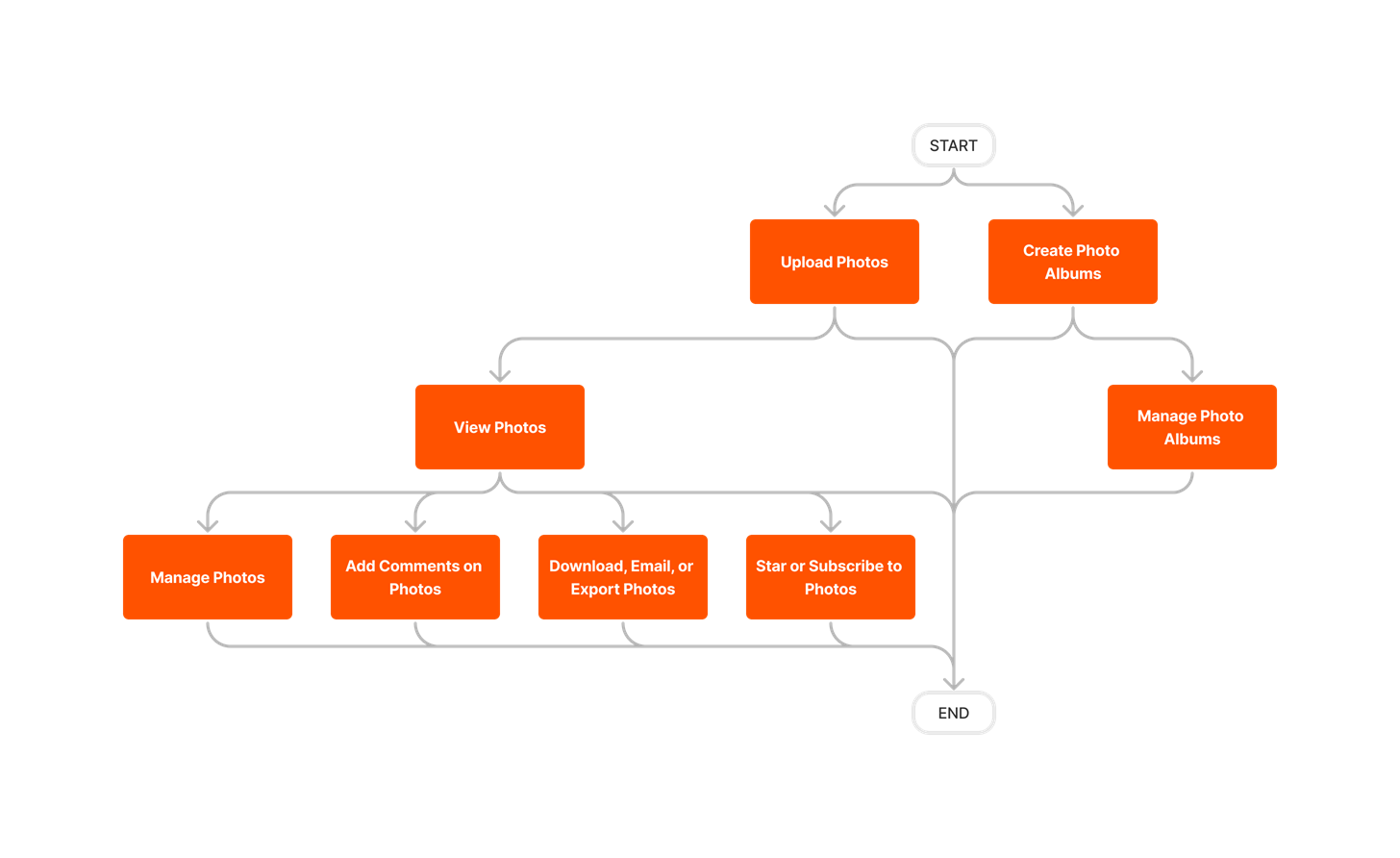


 : Procore の iOS や Android アプリケーションでサポートされているアクションを示します。
 + : Indicates that one or more granular permissions are available for the task. See the relevant tutorial or Grant Granular Permissions in a Project Permissions Template for more information.