メインコンテンツへスキップ
Procore

プロジェクト概要について

概要

 In Beta
This feature is currently available to all customers in Australia, Canada, United Kingdom, United States, and New Zealand. Users in other regions can access the Project Home. Please reach out to your Procore point of contact to request to enable this feature. 

Procore の従来のプロジェクト ホーム ページを置き換えるように設計されたプロジェクト概要ページは、Procore ユーザーが個々のニーズに基づいて、関連情報を確認し、リスクを明らかにし、重要なプロジェクト タスクに対して1か所でアクションを実行できるようにするために構築されました。

プロジェクト概要では、以下を提供します:

  • 重要なプロジェクト情報への素早いアクセス。
  • 未処理案件の拡張表示。
  • 主要なプロジェクト イニシアチブを識別し、追跡する機能。
  • プロアクティブなインサイトを通じて、プロジェクトの主要なリスクを簡単に特定して対処し、プロジェクトの効率を向上させます。
  • ベスト プラクティスと構成ガイド。
  • 1つの場所から情報提供依頼や監査などのさまざまな案件をすばやく作成する機能。

詳細情報

new-project-overview.png


検討事項

  • アクション ボタンと表示される情報を使用できるかどうかは、各ユーザーの個々の権限によって異なります。
  • 表示できるのは、アクセス権のあるツールの未完了項目のみです。
  • 期限を過ぎた項目、期限を過ぎた項目、次の期限、および合計項目の数には、そのツールのすべての項目が反映されます。ただし、ハイパーリンクをクリックすると、それぞれのツール内でアクセスできる案件のみが表示されます。

細部

プロジェクト概要では、次のアクションを実行できます。

プロジェクト情報の表示

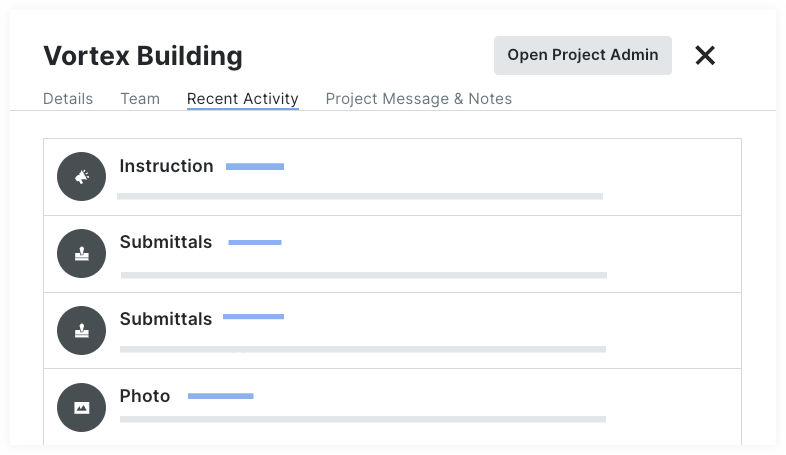
プロジェクトの詳細、プロジェクトチーム、未完了項目、プロジェクトのアクティビティをその場から表示します。

  • プロジェクトの詳細。管理者ツールに移動することなく、プロジェクト名、説明、ロゴ、合計金額などの基本的なプロジェクト情報をすばやく表示および管理できます。
  • プロジェクトチーム。プロジェクトチームのリスト、連絡先情報、プロジェクトでの役割を表示します。
  • 最近のアクティビティ。プロジェクト内のどの項目が誰によって最近作成または更新されたかを確認します。
  • プロジェクトのメッセージとメモ。 プロジェクト メッセージを作成して、重要な詳細をチームと共有します。

    project-message.png

プロジェクト概要チュートリアル」を参照してください。

案件のクイック作成

プロジェクト概要ページから直接、情報提供依頼、提出資料、日報データなどをすばやく作成できます。

簡易作成で使用できる項目:

  • 変更イベント
  • 日報
  • 安全関連事案
  • 検査
  • 監査
  • 残工事リスト
  • 情報提供依頼
  • 提出資料
  • タスク
  • タイムシート

項目をクイック作成する」を参照してください。

プロジェクト インサイトを取得する

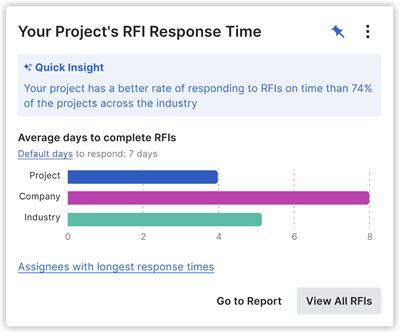
プロアクティブなインサイトを通じて、プロジェクトの主要なリスクを簡単に特定して対処し、プロジェクトの効率を向上させます。現在、日報、情報提供依頼、提出資料に的を絞った分析情報があります。

daily-logs-insights.png new-rfi-insight.png new-image-submittals.png

プロジェクトの分析情報を表示する」を参照してください


未完了項目の表示

自分の未完了項目と、他のユーザーに割り当てられているプロジェクト全体の未処理項目を表示します。アクセスできる案件の詳細のみを表示できます。「未完了項目を表示する」を参照してください。

all-open-items.png


プロジェクト リンクを管理する

プロジェクト概要ページの上部に表示されるリンクを追加して、チームが頻繁にアクセスするページやファイルに簡単にアクセスできるようにすることができます。「プロジェクト リンクを追加、編集、または削除する」を参照してください。

create-and-manage-project-links.png 


プロジェクト アクティビティの表示

Procore の項目と最新のアクティビティのリストを表示します。リンクをクリックして案件を開き、現在の情報を確認します。「最近のプロジェクト アクティビティを表示する」を参照してください

project-activity.png


一般的な質問

What does the project Overview page Look Like compared to the Legacy Project Home page?

Your project's home page might look different depending on your company's tool set, your permissions, and other configurations. 

New

legacy-project-home.png

Legacy

What's the difference between the legacy project home page, and the new project overview?


Function

New Project Overview

Legacy Project Home

Project Setup Guide

icon-inspections-pass.png

icon-inspections-fail.png

Project Name

icon-inspections-pass.png

icon-inspections-pass.png

Project Team

icon-inspections-pass.png

icon-inspections-pass.png

Project Overview

icon-inspections-pass.png

(All Open Items)

icon-inspections-pass.png

My Open Items

icon-inspections-pass.png

icon-inspections-pass.png

All Open Items

icon-inspections-pass.png

icon-inspections-fail.png

Recently Changed Items

icon-inspections-pass.png

icon-inspections-pass.png

Project Weather

icon-inspections-pass.png

icon-inspections-pass.png

Project Links

icon-inspections-pass.png

icon-inspections-pass.png

Update Project Information

  • Project number & name

  • Project photo

  • Project location

  • Project stage

  • Project type

  • Total value

  • Square footage

icon-inspections-pass.png

icon-inspections-fail.png

Project Milestones

icon-inspections-fail.png

icon-inspections-pass.png

Today's Schedule

icon-inspections-fail.png

icon-inspections-pass.png


詳細

Recent Changes

Enhanced 'All Open Items' Experience (08/14/2025)

Procore has updated the 'All Open Items' card in the Project Overview, introducing several user interface enhancements. The 'All Open Items' card now features a better item count mechanism, a 'Last Updated' timestamp, and a 'Refresh' button to ensure a responsive and reliable experience. To learn more about Open Items, see View Open Items from the Project Overview.

Enhanced Open Items Experience (03/03/2025)

Procore improved the accuracy, usability, and performance of Open Items by ensuring consistency between My Open Items and All Open Items, refining item categorization, and enhancing permissions handling. The Open Items feature now includes more detailed item names, an expanded list capacity, and improved UI clarity for better project tracking. To learn more, see View Open Items from the Project Overview.

Project links now carry over from the Project Overview page of a project template to a new project created from that template. See What gets copied over to a new project from a project template? for details. 

NEW PROCORE INSIGHTS (06/04/2024) 

New Project Insights are now available within the Project Overview experience. This feature enables users to proactively identify potential risks that may impact their projects, allowing them to take corrective action promptly. Current Insights available are Average Submittal Response Time and Average RFI Response Time. See About Procore Insights.

New Project Overview for New Customers (05/20/2024)

 In Beta
This feature is currently available to all customers in Australia, Canada, United Kingdom, United States, and New Zealand. Users in other regions can access the Project Home. Please reach out to your Procore point of contact to request to enable this feature.

The Project Overview is built to empower Procore users to see relevant information, surface risks, and take action on important project tasks all in one place based on their individual needs. The Project Overview gives quick access to important project information, an enhanced view of open items, and the ability to quickly create different items like RFIs and Observations from a single location. See About the Project Overview.