変更指示
検索クエリに一致する案件はありません。
クライアント契約変更指示 |
構成タスク: 変更指示ツール構成タスク: プロジェクト会計ツール |
Tip
To browse and search all Procore training videos, visit our video library.
Web
Configure Change Event Settings
Manage Change Orders
Create a Change Event - General Contractor
Create a Change Event - Owner
Create a Change Event - Specialty Contractor
Create a Commitment Change Order - General Contractor
Create a Commitment Change Order - Owner
Create a Commitment Change Order - Specialty Contractor
Create Bulk Commitment Change Orders from a Change Event
Create a Prime Contract Change Order - General Contractor
Create a Funding Change Order - Owner
Create a Client Contract Change Order - Specialty Contractor
Create a Prime PCO - Owner
Review PCCOs - Owner
Submit a Field Initiated Change Order as a Collaborator
Create and Send RFQs
Create and Send RFQs - Owner
Respond to an RFQ - Owner
Respond to an RFQ on Behalf of a Collaborator
Update Change Orders
Allow Collaborators to Submit a Field Initiated Change Order
Mobile
Create a Change Event (Mobile) - Field Worker
Add a Line Item to a Change Event (Mobile) - Field Worker
OUTDATED VIDEOS - Removed from Support Site and Certifications
Create a Client Contract CO - Specialty Contractor
Specialty Contractor - Create a Client Contract CO
Create a Prime PCO
Owner - Respond to an RFQ
Owner - Review Prime Contract COs
Owner - Create and Send an RFQ
Create an RFQ
Owner - Create a Prime PCO
Specialty Contractor - Create an CCO
Owner - Create an CCO
Create an CCO
Field Worker - Add a Line Item to a Change Event (Mobile)
Field Worker - Create a Change Event (Mobile)
Owner - Create a Change Event
Specialty Contractor as a Client - Create a Change Event
Create Change Events
Specialty contractor as a Client - Respond to an RFQ on Behalf of a Subcontractor
Video content may not accurately reflect the current state of the system, and/or it may be out of date.
OUTDATED VIDEOS - Removed from Support Site and Certifications
Create a Commitment Change Order (CCO)
Video content may not accurately reflect the current state of the system, and/or it may be out of date.
Specialty Contractor - Create a Commitment Change Order (CCO)
Video content may not accurately reflect the current state of the system, and/or it may be out of date.
Owner - Create a Commitment Change Order (CCO)
Video content may not accurately reflect the current state of the system, and/or it may be out of date.
Create a Prime PCO
Video content may not accurately reflect the current state of the system, and/or it may be out of date.
Update Change Orders
Video content may not accurately reflect the current state of the system, and/or it may be out of date.
Specialty contractor as Client - Create a Prime PCO
Video content may not accurately reflect the current state of the system, and/or it may be out of date.
Owner - Create a Prime PCO
Video content may not accurately reflect the current state of the system, and/or it may be out of date.
Owner - Review Prime Contract COs
Video content may not accurately reflect the current state of the system, and/or it may be out of date.
Portfolio Financials - Approving or Rejecting a Change Order
Video content may not accurately reflect the current state of the system, and/or it may be out of date.
Portfolio Financials - Sending a Change Order For Approval
Video content may not accurately reflect the current state of the system, and/or it may be out of date.
Web
Create a Change Event - General Contractor
Create a Commitment Change Order - General Contractor
Create a Prime Contract Change Order - General Contractor
Create and Send RFQs
Respond to an RFQ on Behalf of a Collaborator
Mobile
Create a Change Event (Mobile) - Field Worker
Add a Line Item to a Change Event (Mobile) - Field Worker
OUTDATED VIDEOS - Removed from Support Site and Certifications
Field Worker - Create a Change Event (Mobile)
Video content may not accurately reflect the current state of the system, and/or it may be out of date.
Field Worker - Add a Line Item to a Change Event (Mobile)
Video content may not accurately reflect the current state of the system, and/or it may be out of date.
Web
Create a Change Event - General Contractor
Create a Commitment Change Order - General Contractor
Create a Prime Contract Change Order - General Contractor
Create and Send RFQs
Respond to an RFQ on Behalf of a Collaborator
Mobile
Create a Change Event (Mobile) - Field Worker
Add a Line Item to a Change Event (Mobile) - Field Worker
OUTDATED VIDEOS - Removed from Support Site and Certifications
Field Worker - Create a Change Event (Mobile)
Video content may not accurately reflect the current state of the system, and/or it may be out of date.
Field Worker - Add a Line Item to a Change Event (Mobile)
Video content may not accurately reflect the current state of the system, and/or it may be out of date.
Web
Create a Change Event - General Contractor
Create a Commitment Change Order - General Contractor
Create a Prime Contract Change Order - General Contractor
Create and Send RFQs
Respond to an RFQ on Behalf of a Collaborator
Mobile
Create a Change Event (Mobile) - Field Worker
Add a Line Item to a Change Event (Mobile) - Field Worker
Web
Create a Change Event - General Contractor
Create a Commitment Change Order - General Contractor
Create a Prime Contract Change Order - General Contractor
Create and Send RFQs
Respond to an RFQ on Behalf of a Collaborator
Mobile
Create a Change Event (Mobile) - Field Worker
Add a Line Item to a Change Event (Mobile) - Field Worker
OUTDATED VIDEOS - Removed from Support Site and Certifications
Field Worker - Create a Change Event (Mobile)
Video content may not accurately reflect the current state of the system, and/or it may be out of date.
Field Worker - Add a Line Item to a Change Event (Mobile)
Video content may not accurately reflect the current state of the system, and/or it may be out of date.
Web
Create a Change Event - General Contractor
Create a Commitment Change Order - General Contractor
Create a Prime Contract Change Order - General Contractor
Create and Send RFQs
Respond to an RFQ on Behalf of a Collaborator
Update Change Orders
Mobile
Create a Change Event (Mobile) - Field Worker
Add a Line Item to a Change Event (Mobile) - Field Worker
OUTDATED VIDEOS - Removed from Support Site and Certifications
Field Worker - Add a Line Item to a Change Event (Mobile)
Field Worker - Create a Change Event (Mobile)
Create Change Events
Create a Prime PCO
Create an CCO
Web
Create a Change Event - General Contractor
Create a Commitment Change Order - General Contractor
Create a Prime Contract Change Order - General Contractor
Create and Send RFQs
Respond to an RFQ on Behalf of a Collaborator
Update Change Orders
Mobile
Create a Change Event (Mobile) - Field Worker
Add a Line Item to a Change Event (Mobile) - Field Worker
OUTDATED VIDEOS - Removed from Support Site and Certifications
Create Change Events
Video content may not accurately reflect the current state of the system, and/or it may be out of date.
Create a Prime PCO
Video content may not accurately reflect the current state of the system, and/or it may be out of date.
Create an CCO
Video content may not accurately reflect the current state of the system, and/or it may be out of date.
Field Worker - Add a Line Item to a Change Event (Mobile)
Video content may not accurately reflect the current state of the system, and/or it may be out of date.
Field Worker - Create a Change Event (Mobile)
Video content may not accurately reflect the current state of the system, and/or it may be out of date.
Web
Create a Change Event - General Contractor
Create a Commitment Change Order - General Contractor
Create a Prime Contract Change Order - General Contractor
Create and Send RFQs
Respond to an RFQ on Behalf of a Collaborator
Mobile
Create a Change Event (Mobile) - Field Worker
Add a Line Item to a Change Event (Mobile) - Field Worker
OUTDATED VIDEOS - Removed from Support Site and Certifications
Field Worker - Add a Line Item to a Change Event (Mobile)
Video content may not accurately reflect the current state of the system, and/or it may be out of date.
Field Worker - Create a Change Event (Mobile)
Video content may not accurately reflect the current state of the system, and/or it may be out of date.
Web
Create a Change Event - General Contractor
Create a Commitment Change Order - General Contractor
Create a Prime Contract Change Order - General Contractor
Create and Send RFQs
Respond to an RFQ on Behalf of a Collaborator
Mobile
Create a Change Event (Mobile) - Field Worker
Add a Line Item to a Change Event (Mobile) - Field Worker
OUTDATED VIDEOS - Removed from Support Site and Certifications
Create a Change Event
Video content may not accurately reflect the current state of the system, and/or it may be out of date.
Create a Commitment Change Order
Video content may not accurately reflect the current state of the system, and/or it may be out of date.
Create a Prime Contract Change Order
Video content may not accurately reflect the current state of the system, and/or it may be out of date.
Field Worker - Add a Line Item to a Change Event (Mobile)
Video content may not accurately reflect the current state of the system, and/or it may be out of date.
Field Worker - Create a Change Event (Mobile)
Video content may not accurately reflect the current state of the system, and/or it may be out of date.
Web
Configure Change Event Settings
Manage Change Orders
Create a Change Event - General Contractor
Create a Change Event - Owner
Create a Change Event - Specialty Contractor
Create a Commitment Change Order - General Contractor
Create a Commitment Change Order - Owner
Create a Commitment Change Order - Specialty Contractor
Create Bulk Commitment Change Orders from a Change Event
Create a Prime Contract Change Order - General Contractor
Create a Funding Change Order - Owner
Create a Client Contract Change Order - Specialty Contractor
Create a Prime PCO - Owner
Review PCCOs - Owner
Submit a Field Initiated Change Order as a Collaborator
Create and Send RFQs
Create and Send RFQs - Owner
Respond to an RFQ - Owner
Respond to an RFQ on Behalf of a Collaborator
Update Change Orders
Allow Collaborators to Submit a Field Initiated Change Order
Mobile
Create a Change Event (Mobile) - Field Worker
Add a Line Item to a Change Event (Mobile) - Field Worker
OUTDATED VIDEOS - Removed from Support Site and Certifications
Create a Client Contract CO - Specialty Contractor
Specialty Contractor - Create a Client Contract CO
Create a Prime PCO
Owner - Respond to an RFQ
Owner - Review Prime Contract COs
Owner - Create and Send an RFQ
Create an RFQ
Owner - Create a Prime PCO
Specialty Contractor - Create an CCO
Owner - Create an CCO
Create an CCO
Field Worker - Add a Line Item to a Change Event (Mobile)
Field Worker - Create a Change Event (Mobile)
Owner - Create a Change Event
Specialty Contractor as a Client - Create a Change Event
Create Change Events
Specialty contractor as a Client - Respond to an RFQ on Behalf of a Subcontractor
Video content may not accurately reflect the current state of the system, and/or it may be out of date.
OUTDATED VIDEOS - Removed from Support Site and Certifications
Create a Commitment Change Order (CCO)
Video content may not accurately reflect the current state of the system, and/or it may be out of date.
Specialty Contractor - Create a Commitment Change Order (CCO)
Video content may not accurately reflect the current state of the system, and/or it may be out of date.
Owner - Create a Commitment Change Order (CCO)
Video content may not accurately reflect the current state of the system, and/or it may be out of date.
Create a Prime PCO
Video content may not accurately reflect the current state of the system, and/or it may be out of date.
Update Change Orders
Video content may not accurately reflect the current state of the system, and/or it may be out of date.
Specialty contractor as Client - Create a Prime PCO
Video content may not accurately reflect the current state of the system, and/or it may be out of date.
Owner - Create a Prime PCO
Video content may not accurately reflect the current state of the system, and/or it may be out of date.
Owner - Review Prime Contract COs
Video content may not accurately reflect the current state of the system, and/or it may be out of date.
Portfolio Financials - Approving or Rejecting a Change Order
Video content may not accurately reflect the current state of the system, and/or it may be out of date.
Portfolio Financials - Sending a Change Order For Approval
Video content may not accurately reflect the current state of the system, and/or it may be out of date.
- (ベータ版) プロジェクトレベルのワークフローでは、どのようなアクセス権限が利用できますか?
- (草案) 変更指示を編集するために必要なユーザー権限は何ですか?
- 上流部門協力者はどの階層で変更指示を承認できますか?
- 期限を過ぎた変更指示を確認するレポートを作成できますか?
- Procore で財務オブジェクトの番号付けシステムをカスタマイズできますか?
- 変更イベント ツールで、新しい委託契約・発注の変更指示の費用基準を「最新費用」または「最新価格」に設定できますか?
- パッケージ内の変更指示ステータスはどのようにリンクされますか?
- 財務項目と予算コードは変更オブジェクト間でどのように更新されますか?
- Procore ウェブ アプリケーションの問題をトラブルシューティングするにはどうすればよいですか?
- Procore プロジェクトで税コードを使用するにはどうすればよいですか?
- ウェブ ブラウザの mailto リンク用の既定の電子メール クライアントを変更するにはどうすればよいですか?
- 承認された変更指示の項目を削除するにはどうすればよいですか?
- 多階層化された場所で案件を絞り込むにはどうすればよいですか?
- Procore の「関連項目」とは何ですか?
- 「生産量」とは何ですか?
- Procore の既定の変更タイプと変更理由は何ですか?
- Procore の既定の費用コードとは何ですか?
- Procore の変更指示の既定のステータスは何ですか?
- 単一ツール レポートのさまざまな財務項目オプションとは何ですか?
- プロジェクト会計のさまざまな変更指示階層設定とは何ですか?
- Procore の様々な DocuSign® バナーは何を意味しますか?
- カスタム フィールドのリリースは、変更指示の従来のカスタム ソリューションにどのような影響を与えますか?
- プロジェクトの変更指示ツールでは、どのようなアクセス権限が利用できますか?
- 「草案以外の編集を契約と変更指示に制限する」と「価値表を常に編集可能にする」の両方を有効にするとどうなりますか?
- Procore の作業分解構成図の予算コードとは何ですか?
- 変更指示とは何ですか?
- 変更指示とは何ですか?
- 下流部門協力者とは何ですか?
- 上流部門協力者とは何ですか?
- 変更イベントから変更指示の予定価格表に取り込まれる値は何ですか?
- Procore から送信される電子メール内のダウンロード リンクの有効期限はいつ切れますか?
- 変更指示ツールの「署名が必要」列に署名者の名前が表示されるのはいつですか?
- Procore の案件に添付できる Microsoft Excel ファイルのバージョンはどれですか?
- どの Procore フィールドが DocuSign© のフィールドに対応していますか?
- DocuSign® との統合をサポートする Procore プロジェクト ツールはどれですか?
- どの Procore プロジェクト ツールが現場生産レポートのデータを更新しますか?
- どの Procore ツールが作業分解構成図をサポートしていますか?
- Procore のマスター リストにはどの測定単位が含まれていますか?
- Procore のマスター リストにはどの測定単位が含まれていますか?
- 変更指示を作成できないのはなぜですか?
- 「承認済み」変更指示を編集または削除できないのはなぜですか?
- 委託契約・発注の変更指示を Sage 300 CRE にエクスポートするときに、「インポート操作に設定されたタイムアウトよりも長い時間がかかりました」というエラーが表示されるのはなぜですか?
- 委託契約・発注の変更指示を Sage 300 CRE にエクスポートするときに「関係の不一致の可能性」エラーが表示されるのはなぜですか?
注
変更指示ツールは、変更イベント ツール用に定義されたワークフローを使用します。「変更イベント - ワークフロー図」を参照してください。変更指示階層
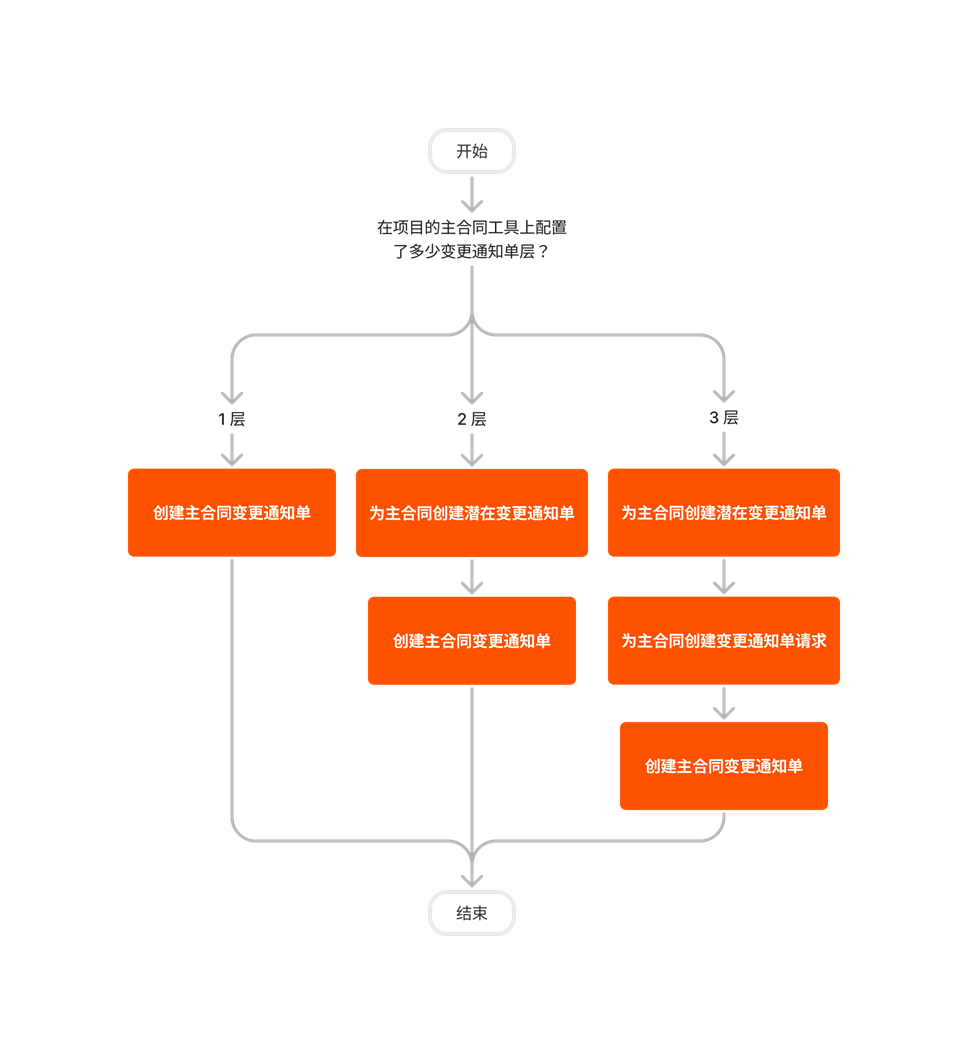
変更指示の作成に使用するステップは、元の契約の作成に使用された Procore プロジェクト ツールで構成された変更指示の階層設定によって異なります。詳細については、「プロジェクト会計における変更指示のさまざまな階層設定とは何ですか?」を参照してください。
クライアント契約変更指示階層

委託契約・発注の変更指示の階層


資金調達の変更指示階層

元請契約変更指示の階層


変更指示
次の表は、説明されているユーザー アクションを実行するために必要なユーザー権限を示しています。
| タスク | なし | 読み取り専用 | 標準 | 管理者 |
|---|---|---|---|---|
| 関連項目を委託契約・発注の変更指示に追加する |  |
|
||
| 関連項目を元請契約変更指示に追加する | |
|||
| 委託契約・発注の変更指示を承認または否認する 1 | |
|
||
| 詳細設定を構成する: 変更指示 | |
|||
| 変更指示の PDF を作成する | |
|
|
|
| 変更指示を編集する 2 | |
|||
| 変更指示を電子メールで転送する | |
|
||
| 委託契約・発注の変更指示のレビューと対応 | |
|
|
|
| 変更指示の表示 3,4 | |
|
|
1 変更指示ツールに対する「標準」レベルの権限を持つユーザーとしてこのタスクを実行するには、変更指示の「指定レビュー担当者」である必要があります。「 委託契約・発注の変更指示を作成する」を参照してください。
2 プロジェクトの変更指示ツールに対する「管理者」レベルの権限を持つユーザーには、追加のツール権限を付与する必要があります: (1) 委託契約・発注の変更指示 (CCO) を編集するには、プロジェクトの委託契約・発注管理ツールに対する「管理者」レベルの権限、および/または(2) 元請契約変更指示 (PCCO) を編集するには、プロジェクトの元請契約ツールに対する「管理者」レベルの権限。その他の要因も適用される場合があります。詳細については、「変更指示を編集する」を参照してください。
3 プロジェクトの変更指示ツールで「読み取り専用」または「標準」レベルの権限を持つユーザーは、「非公開」とマークされていない契約の変更指示を表示できます。契約が「非公開」とマークされている場合、ユーザーは契約の [非公開] ドロップダウンリストに追加される必要があります。
4 プロジェクトの変更指示ツールに対する「管理者」レベルの権限を持つユーザーは、「非公開」とマークされていない契約の変更指示を表示することもできます。契約が「非公開」とマークされている場合、ユーザーには (A) 契約の「非公開」ドロップダウンリストに追加されるか、(B) 委託契約・発注管理や元請契約のツールに対する「管理者」レベルの権限が割り当てられます。
管理者ツール
次の表は、説明されているユーザー アクションを実行するためにプロジェクトの管理者ツールで必要なユーザー権限を示しています。
| タスク | なし | 読み取り専用 | 標準 | 管理者 |
|---|---|---|---|---|
| 変更指示ツールを有効にする | |
以下は、プロジェクトの変更指示ツールに対する注目すべき変更点です。
最近の変更点
次世代エクスペリエンス リストビュー (2026 年 02 月 17 日)
変更指示の最新化されたリストビューは、縮尺的なプロジェクト変更を管理するための、より高速で直感的なインターフェイスを提供します。この機能強化により、パフォーマンスと応答性が大幅に向上し、財務チームは大量のデータを簡単にナビゲートおよび検索できるようになります。Procore の更新された UI 標準に準拠することで、この強化されたビューはワークフローを合理化し、高度なフィルタリングとレポートの基盤を築き、ユーザーがより厳格な財務管理を維持し、プロジェクト リスクをより適切に追跡するのに役立ちます。ベータ版に登録するには、「Procore Explore を使用した機能の管理」を参照してください。
請求可能なバリエーション (2025 年 11 月 10 日)
Procore は、すべてのお客様に請求可能なバリエーション機能を導入しています。この機能により、変更指示に新しい「保留中 - 請求可能」ステータスが追加されます。すべての地域の請負業者は、未承認の変更指示をすばやく確認し、これらの金額を請求書に含めることができるようになりました。この機能はもともと、ANZ、CAN、および UKI の請負業者が現地の支払い法に準拠できるようにするために開発されました。請求可能なバリエーションは、委託契約・発注と元請契約の両方で機能しますが、単一階層の変更指示のみをサポートします。この機能を使用すると、システムは請求書を自動的に更新し、変更指示のステータス別に項目をグループ化し、すべての請求のバリエーションを概要に明確に表示します。
変更指示ツールで署名が必要な列が利用可能になりました (2025 年 05 月 12 日)
Procore は、変更指示ツールに「署名が必要」列を追加しました。ユーザーが自分の DocuSign© アカウントを Procore プロジェクトにリンクすると、この列は [元請契約] タブと同じように機能するため、委託契約書または元請契約の [変更履歴] タブを検索して変更指示の署名ステータスを確認する必要がなくなります。この列のしくみについては、「変更指示ツールの「署名が必要」列に署名者の名前が表示されるのはいつですか?」を参照してください。