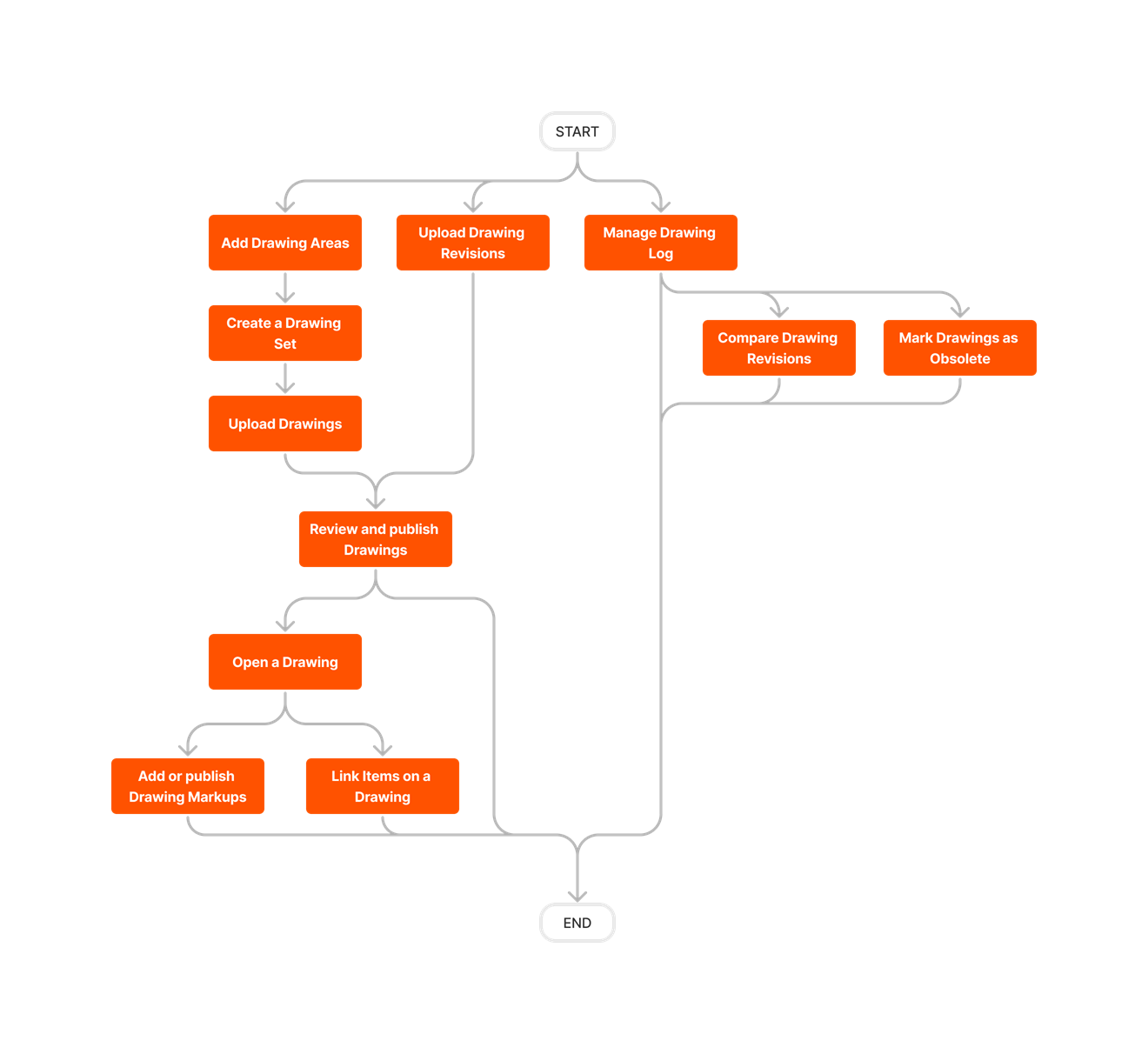
図面ツールを使用すると、プロジェクトの図面と改訂を管理およびアーカイブして、チーム メンバーが常に最新の図面セットにアクセスできるようになります。
よくある質問 (すべて表示)
検索クエリに一致する案件はありません。
To browse and search all Procore training videos, visit our video library.
Video content may not accurately reflect the current state of the system, and/or it may be out of date.


次の表は、説明されているユーザー操作を実行するために必要なユーザー権限を示しています。
: Procore の iOS や Android の携帯アプリケーションでサポートされているアクションを示します。
+ : Indicates that one or more granular permissions are available for the task. See the relevant tutorial or Grant Granular Permissions in a Project Permissions Template for more information.
1 ユーザーは、プロジェクトの写真ツールに対する「読み取り専用」以上の権限も持っている必要があります。
2 図面ツールで「標準」レベルの権限を持つユーザーは、プロジェクトで「標準レベルのユーザーに、公開済みマークアップ設定の削除を許可」設定が有効になっている場合、公開済み図面マークアップツールを削除できます。「ユーザーが公開されたマークアップを削除できるようにする」を参照してください。
3 「管理者」権限を持つユーザーのみが、他のユーザーを図面ツールに登録または登録解除できます。
4 ユーザーは、測定マークアップ ツールを使用して図面に追加した独自の測定のみを表示できます。「図面に測定を追加する」を参照してください。
以下は、プロジェクトの図面ツールに対する注目すべき変更点です。
Procore modernized the Company Admin Pages for the Drawings tool to support a more unified customer experience and improved operational efficiency. The Drawings Admin feature retained its familiar UI and functionality, ensuring a seamless transition for users while delivering enhanced reliability and performance.
Procore は、従来のデータ テーブルを最新のユーザー インターフェイスに置き換えることで、 図面ツール をアップグレードしました。このツールは、他の Procore ツールに匹敵する合理化された直感的なレイアウトを特徴とし、機能を損なうことなく一貫性と使いやすさを向上させました。
Procore は、古いデータ テーブルを新しいテーブルに置き換えて図面 ツール を更新し、最新のユーザー インターフェイスの新しい設計パターンに合わせて調整しました。図面ツールは、より一貫性のある直感的なエクスペリエンスを提供し、機能を損なうことなく、よりモダンなルック アンド フィールを提供します。
Procore は、古い右側のパネルを削除し、そのコンポーネントをメイン ページに再配置して、更新された設計パターンに合わせて図面ツールを最新化しました。図面ツールは、より直感的ですっきりとしたインターフェイスを提供し、リストビューにデータ用のスペースを提供することでユーザー エクスペリエンスを向上させました。詳細については、「 図面のアップロード 」、「 図面のダウンロード 」、「 図面の電子メール送信 」、「 一括編集 」、「 図面の改訂 」を参照してください。 場所 、および 図面レポート 。
モバイル アプリケーションは、iOS と Android の両方でマークアップのコピー/ペーストおよび複製機能を強化しました。これらの改善により、既存のマークアップを効率的にコピーして、携帯機器上の同じ図面内または異なる図面内の他の場所に貼り付けたり、選択したマークアップを複製したりできるようになりました。これらの モバイル マークアップ機能を強化することで、マークアップを効率的に管理および複製できるようになり、反復タスクが減り、現場でのワークフローが改善されます。
図面ツールには、マークアップ用の 2 つの新しいアクション (コピーと複製) があります。 [コピー ] を選択すると、マークアップがクリップボードに保存され、 別の 図面に貼り付けることができます。 両方の図面が同じ寸法の場合、マークアップは元の図面と同じ座標に自動的に貼り付けられます。 [複製 ] は、マークアップの複製を作成し、 同じ 図面内の元のマークアップの近くに貼り付けるので、図面内の目的の場所に移動できます。 一度に複数のマークアップを選択すると、これらのアクションをまとめて実行できます。 マークアップをクリックしたときに表示されるメニューでこれらの新しいボタンを見つけて、今日からマークアップ プロセスのスピードアップを始めましょう! 「 図面マークアップツールを編集する」を参照してください。
プロジェクトの図面の QRコードを生成し、印刷して現場に掲示することができます。ユーザーは Procore Mobile アプリケーションで QRコードをスキャンし、携帯機器で図面を表示できます。「図面の QRコードの生成と印刷」、「QRコードをスキャンする (Android)」、および「QRコードをスキャンする (iOS)」を参照してください。
図面に追加された測定マークアップには、1/32 の精度内で測定値の端数が表示されるようになりました。「図面に測定値を追加する」を参照してください。これらの測定値は、すべての Procore アプリケーション (Web、iOS、Android)、およびマークアップ付きの PDF としてダウンロードされた図面で表示できます。「図面をダウンロードする」を参照してください。
注: この変更は、2023 年7月 10 日より前に作成された既存の図面測定マークアップには影響しません。
Procore は、図面のアップロード モーダルの詳細オプションを更新し、アンダースコア (_) を含む図面番号から改訂を取得できるようにしました。「図面改訂をアップロードする」を参照してください。「改訂を含む」チェックボックスが「図面番号に改訂を含む」ドロップダウン メニューに変更され、図面番号に改訂が含まれるかどうか、および改訂が最後の小数点以降か最後のアンダースコアより後かを選択できるようになりました。
注: この更新の一環として、詳細オプションの「図面改訂」フィールド名が「既定の改訂」に変更されました。