メインコンテンツへスキップ
Procore

写真

写真ツールを使用すると、プロジェクトの写真を簡単にキャプチャ、保存、安全なオンラインアーカイブで共有できます。 スマートフォンやタブレットを使用して、進捗状況の写真をすばやく撮影し、マークアップを追加して、他のチームメンバーと即座に共有できます。

  • スマートフォン、タブレット、またはコンピュータから写真をキャプチャしてアップロードする
  • 無制限の数のデジタル写真を保存し、カテゴリー別に整理
  • 写真を自動的にバックアップ
  • すべてまたは特定のチームメンバーに写真へのアクセスを許可する
  • 携帯機器からフィールドに詳細とコメントを追加して写真をマークアップします

There are no items that match your search query.

 Tip

To browse and search all Procore training videos, visit our video library.

Web

Upload Photos
 
Manage Photos
 

Mobile

Photos Overview (Mobile)
 

OUTDATED VIDEOS - Removed from Support Site and Certifications

Configure Photo Settings


Configure Photos


Video content may not accurately reflect the current state of the system, and/or it may be out of date.

Photos Mobile


Video content may not accurately reflect the current state of the system, and/or it may be out of date.

Photo Management


Video content may not accurately reflect the current state of the system, and/or it may be out of date.

Specialty Contractor as Client - Upload Photos


Video content may not accurately reflect the current state of the system, and/or it may be out of date.

Specialty Contractor as Client - Photos (Mobile)


Video content may not accurately reflect the current state of the system, and/or it may be out of date.

Owner - Manage Photos


Video content may not accurately reflect the current state of the system, and/or it may be out of date.

Owner - Photos Mobile


Video content may not accurately reflect the current state of the system, and/or it may be out of date.

Owner - Upload Photos


Video content may not accurately reflect the current state of the system, and/or it may be out of date.

Superintendent - Photos (Web)


Video content may not accurately reflect the current state of the system, and/or it may be out of date.

Superintendent - Photos (Mobile)


Video content may not accurately reflect the current state of the system, and/or it may be out of date.

Web

Upload Photos
 
Manage Photos
 

Mobile

Photos Overview (Mobile)
 

OUTDATED VIDEOS - Removed from Support Site and Certifications

Overview (Mobile)


Video content may not accurately reflect the current state of the system, and/or it may be out of date.

Web

Upload Photos
 
Manage Photos
 

Mobile

Photos Overview (Mobile)
 

OUTDATED VIDEOS - Removed from Support Site and Certifications

Photos: Manage Photos


Video content may not accurately reflect the current state of the system, and/or it may be out of date.

Photos: Overview (Mobile)


Video content may not accurately reflect the current state of the system, and/or it may be out of date.

Photos: Upload Photos


Video content may not accurately reflect the current state of the system, and/or it may be out of date.

Web

Upload Photos
 
Manage Photos
 

Mobile

Photos Overview (Mobile)
 

OUTDATED VIDEOS - Removed from Support Site and Certifications

Photos: Overview (Mobile)


Video content may not accurately reflect the current state of the system, and/or it may be out of date.

Web

Upload Photos
 
Manage Photos
 

Mobile

Photos Overview (Mobile)
 

OUTDATED VIDEOS - Removed from Support Site and Certifications

Photos: Overview (Mobile)


Video content may not accurately reflect the current state of the system, and/or it may be out of date.

Web

Configure Photo Settings
 
Upload Photos
 
Manage Photos
 

Mobile

Photos Overview (Mobile)
 

OUTDATED VIDEOS - Removed from Support Site and Certifications

Photo Management


Video content may not accurately reflect the current state of the system, and/or it may be out of date.

Configure Photos


Video content may not accurately reflect the current state of the system, and/or it may be out of date.

Photos Mobile


Video content may not accurately reflect the current state of the system, and/or it may be out of date.

Web

Upload Photos
 
Manage Photos
 

Mobile

Photos Overview (Mobile)
 

OUTDATED VIDEOS - Removed from Support Site and Certifications


Web

Upload Photos
 
Manage Photos
 

Mobile

Photos Overview (Mobile)
 

OUTDATED VIDEOS - Removed from Support Site and Certifications

Photos - Manage Photos


Video content may not accurately reflect the current state of the system, and/or it may be out of date.

Photos - Upload Photos


Video content may not accurately reflect the current state of the system, and/or it may be out of date.

Photos - Overview (Mobile)


Video content may not accurately reflect the current state of the system, and/or it may be out of date.

Web

Upload Photos
 
Manage Photos
 

Mobile

Photos Overview (Mobile)
 

OUTDATED VIDEOS - Removed from Support Site and Certifications

Photos: Overview (Mobile)


Video content may not accurately reflect the current state of the system, and/or it may be out of date.

Web

Upload Photos
 
Manage Photos
 

Mobile

Photos Overview (Mobile)
 

Web

Upload Photos
 
Manage Photos
 

Mobile

Photos Overview (Mobile)
 

OUTDATED VIDEOS - Removed from Support Site and Certifications

Configure Photo Settings


Configure Photos


Video content may not accurately reflect the current state of the system, and/or it may be out of date.

Photos Mobile


Video content may not accurately reflect the current state of the system, and/or it may be out of date.

Photo Management


Video content may not accurately reflect the current state of the system, and/or it may be out of date.

Specialty Contractor as Client - Upload Photos


Video content may not accurately reflect the current state of the system, and/or it may be out of date.

Specialty Contractor as Client - Photos (Mobile)


Video content may not accurately reflect the current state of the system, and/or it may be out of date.

Owner - Manage Photos


Video content may not accurately reflect the current state of the system, and/or it may be out of date.

Owner - Photos Mobile


Video content may not accurately reflect the current state of the system, and/or it may be out of date.

Owner - Upload Photos


Video content may not accurately reflect the current state of the system, and/or it may be out of date.

Superintendent - Photos (Web)


Video content may not accurately reflect the current state of the system, and/or it may be out of date.

Superintendent - Photos (Mobile)


Video content may not accurately reflect the current state of the system, and/or it may be out of date.

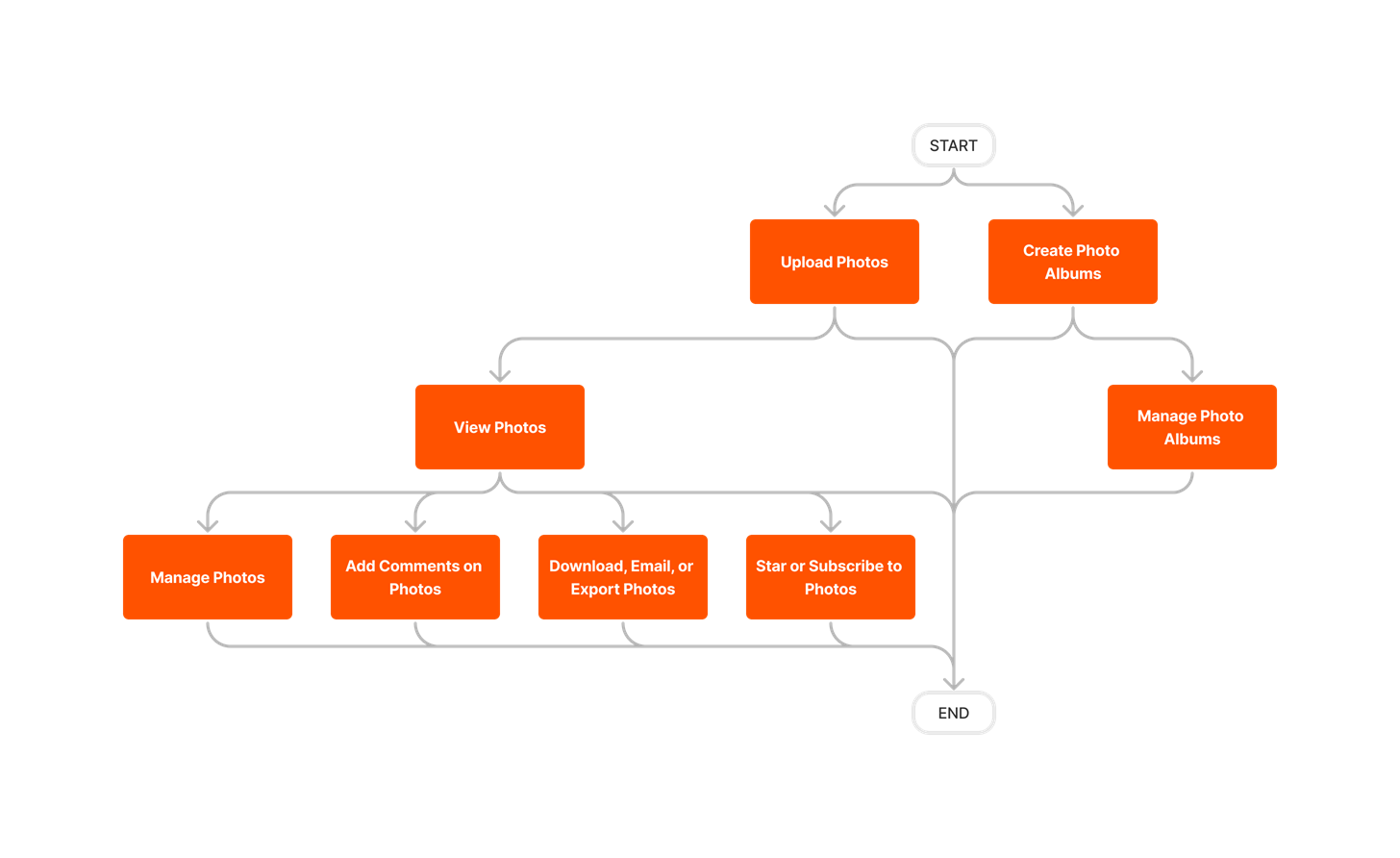
diagram_photos_tool-overview.png

diagram_photos_tool-overview_de-de.png

diagram_photos_tool-overview_en-au.png

diagram_photos_tool-overview_en-ca.png

diagram_photos_tool-overview_en-gb.png

diagram_photos_tool-overview_es-es.png

diagram_photos_tool-overview_es-la.png

diagram_photos_tool-overview_fr-ca.png

diagram_photos_tool-overview_fr-fr.png

diagram_photos_tool-overview_ja-jp.png

diagram_photos_tool-overview_pt-br.png

diagram_photos_tool-overview_zh-sg.png

diagram_photos_tool-overview.png

写真

次の表は、説明されているユーザー アクションを実行するために必要なユーザー権限を示しています。

icon-mindtouch-table-mobile.png: Procore の iOS や Android アプリケーションでサポートされているアクションを示します。

icon-mindtouch-table-check.png+ : Indicates that one or more granular permissions are available for the task. See the relevant tutorial or Grant Granular Permissions in a Project Permissions Template for more information.

タスク なし 読み取り専用 標準 管理者
写真にコメントを追加する icon-mindtouch-table-mobile.png     icon-mindtouch-table-check.png icon-mindtouch-table-check.png
写真に説明を追加する icon-mindtouch-table-mobile.png     icon-mindtouch-table-check.png icon-mindtouch-table-check.png
Assistで写真を解析する   icon-mindtouch-table-check.png icon-mindtouch-table-check.png icon-mindtouch-table-check.png
写真を一括編集     icon-mindtouch-table-check.png 1 icon-mindtouch-table-check.png
詳細設定を構成する: 写真       icon-mindtouch-table-check.png
フォト アルバムを作成する icon-mindtouch-table-mobile.png   icon-mindtouch-table-check.png+ icon-mindtouch-table-check.png icon-mindtouch-table-check.png
フォト アルバムを削除する   icon-mindtouch-table-check.png+ icon-mindtouch-table-check.png+ icon-mindtouch-table-check.png
写真を削除 icon-mindtouch-table-mobile.png       icon-mindtouch-table-check.png
写真のダウンロード icon-mindtouch-table-mobile.png   icon-mindtouch-table-check.png icon-mindtouch-table-check.png icon-mindtouch-table-check.png
写真を電子メールで送信する (受信) icon-mindtouch-table-check.png icon-mindtouch-table-check.png icon-mindtouch-table-check.png icon-mindtouch-table-check.png
写真を電子メールで送信 (送信)  icon-mindtouch-table-mobile.png     icon-mindtouch-table-check.png icon-mindtouch-table-check.png
写真を PDF としてエクスポートする   icon-mindtouch-table-check.png icon-mindtouch-table-check.png icon-mindtouch-table-check.png
スター付き(お気に入り)写真を探す       icon-mindtouch-table-check.png
写真を非公開としてマークする       icon-mindtouch-table-check.png
アルバムを非公開としてマークする       icon-mindtouch-table-check.png
写真を移動する       icon-mindtouch-table-check.png
アルバムの名前を変更する icon-mindtouch-table-mobile.png       icon-mindtouch-table-check.png
フォト アルバムを並べ替える   icon-mindtouch-table-check.png+ icon-mindtouch-table-check.png+ icon-mindtouch-table-check.png
ゴミ箱から写真を取得する       icon-mindtouch-table-check.png
写真を回転させる       icon-mindtouch-table-check.png
写真の検索とフィルタリング icon-mindtouch-table-mobile.png   icon-mindtouch-table-check.png icon-mindtouch-table-check.png icon-mindtouch-table-check.png
プロジェクトの写真を設定する       icon-mindtouch-table-check.png
写真の場所を設定     icon-mindtouch-table-check.png icon-mindtouch-table-check.png
写真にスターを付ける       icon-mindtouch-table-check.png
写真を配信登録する   icon-mindtouch-table-check.png icon-mindtouch-table-check.png icon-mindtouch-table-check.png
写真をアップロードする  icon-mindtouch-table-mobile.png     icon-mindtouch-table-check.png icon-mindtouch-table-check.png
写真を見る icon-mindtouch-table-mobile.png   icon-mindtouch-table-check.png icon-mindtouch-table-check.png icon-mindtouch-table-check.png
非公開写真を表示 icon-mindtouch-table-mobile.png   icon-mindtouch-table-check.png+ icon-mindtouch-table-check.png+ icon-mindtouch-table-check.png 

1 プロジェクトの写真ツールで「標準」レベルの権限を持つユーザーは、写真の説明を一括編集することしかできません。


以下は、プロジェクトの写真ツールに対する注目すべき変更点です。

最近の変更点

モバイルアプリでの360°写真表示に対応 (2025 年 11 月 19 日)

Procore は、Procore 携帯アプリケーション (iOS および Android) 内の写真ツールに、ネイティブでインタラクティブな 360° 画像ビューアを追加しました。写真ツールは、シームレスなフルスクリーン 360° 画像表示エクスペリエンスをサポートするようになりました。現場チームは、アプリケーションから離れることなく、高解像度の360°画像を表示、パン、ズームできます。360°画像ビューアは、サードパーティのアプリケーションに切り替える必要がなく、時間を節約できます。また、ワークフローを合理化し、現場の効率を高めます。「 写真を表示する (iOS)」および「 写真を表示する (Android)」を参照してください。

: 現在、360°画像表示はモバイルアプリの新しい写真でのみサポートされています(2025年11月現在)。

アシストで写真を分析 (2025 年 10 月 23 日)

Procore は、写真ツールにアシスト 付き写真の分析 機能を導入し、ユーザーが複数の写真を選択して AI を活用した概要を生成できるようにしました。Analyze with Assist 機能を使用すると、チームは現場の画像から進捗状況と安全に関する洞察をすばやく要約できるため、関係者は情報を入手し、リスクをプロアクティブに管理できます。

最新の写真: 再設計された設定 (2025 年 10 月 07 日)

[写真設定] ページは、Procore の最新のユーザー エクスペリエンスに合わせて再設計され、より直感的な操作性を実現しました。設定は明確なカテゴリに分かれており、写真設定をよりシームレスに理解できます。「詳細設定を構成する: 写真」を参照してください。

写真用マップ - 一般公開 (2025 年 01 月 08 日)

Procore Maps を使用すると、ユーザーは写真やその他のツール項目を地図上で表示し、場所ごとにクエリを実行し、さまざまなツール間で項目にリンクできます。Procore Maps は、他の Procore 機能とシームレスに統合される包括的なビジュアル ツールを提供することでプロジェクトの実行を強化し、建設プロジェクトの計画、実行、監視を改善します。 「Procore マップ」を参照してください。