メインコンテンツへスキップ
Procore

アクション プラン


アクション プラン ツールは、会社固有の要件とプロジェクト固有の要件を明確に定義し、一元化し、整理するのに役立ちます。アクション プランを使用すると、ユーザーは、定義された作業範囲の品質基準を表す重要なマイルストーンの概要を示すプランを作成できます。アクション プランは、完了した作業の記録を保存し、その完了した作業に対する責任者からの承認を文書化することで、ユーザーが高度な説明責任を維持するのにも役立ちます。

  • ウェブおよびモバイルの iOS または Android でアクション プランを実行する
  • ブロック機能を有効にし、署名を要求する
  • 責任者が項目の完了を検証できるように、検証方法を選択します
  • アクション プラン テンプレートを作成して品質プロセスの基準を確立し、プロジェクトの出発点として機能し、チームは各プロジェクト固有のニーズを満たすために必要に応じて変更できます
  • 検査およびテスト計画(ITP)、品質保証計画、コンクリート打設計画、プロジェクト開始計画、安全計画などのプロセスを合理化します。

There are no items that match your search query.

 Tip

To browse and search all Procore training videos, visit our video library.

Create An Action Plan
 
Perform an Action Plan
 
Sign an Action Plan
 

OUTDATED VIDEOS - Removed from Support Site and Certifications

Create Company Level Action Plan Templates
 
Company Level Action Plan Configurations
 
Create an Action Plan Type
 
Create An Action Plan Template
 
Create An Action Plan
 

OUTDATED VIDEOS - Removed from Support Site and Certifications

Create An Action Plan Template
 
Create an Action Plan Type
 
Create An Action Plan
 
Create An Action Plan
 

OUTDATED VIDEOS - Removed from Support Site and Certifications

Create An Action Plan Template
 
Create an Action Plan Type
 
Create An Action Plan
 

OUTDATED VIDEOS - Removed from Support Site and Certifications

Create An Action Plan Template
 
Create an Action Plan Type
 
Create An Action Plan
 

OUTDATED VIDEOS - Removed from Support Site and Certifications

Create An Action Plan Template
 
Create an Action Plan Type
 
Create An Action Plan
 

OUTDATED VIDEOS - Removed from Support Site and Certifications

Create An Action Plan Template
 
Create an Action Plan Type
 
Create An Action Plan
 

OUTDATED VIDEOS - Removed from Support Site and Certifications

Create An Action Plan Template
 
Create an Action Plan Type
 
Create An Action Plan
 

OUTDATED VIDEOS - Removed from Support Site and Certifications

Create An Action Plan Template
 
Create an Action Plan Type
 
Create An Action Plan
 
Perform an Action Plan
 
Sign an Action Plan
 

OUTDATED VIDEOS - Removed from Support Site and Certifications

Create Company Level Action Plan Templates
 
Company Level Action Plan Configurations
 
Create an Action Plan Type
 
Create An Action Plan Template
 

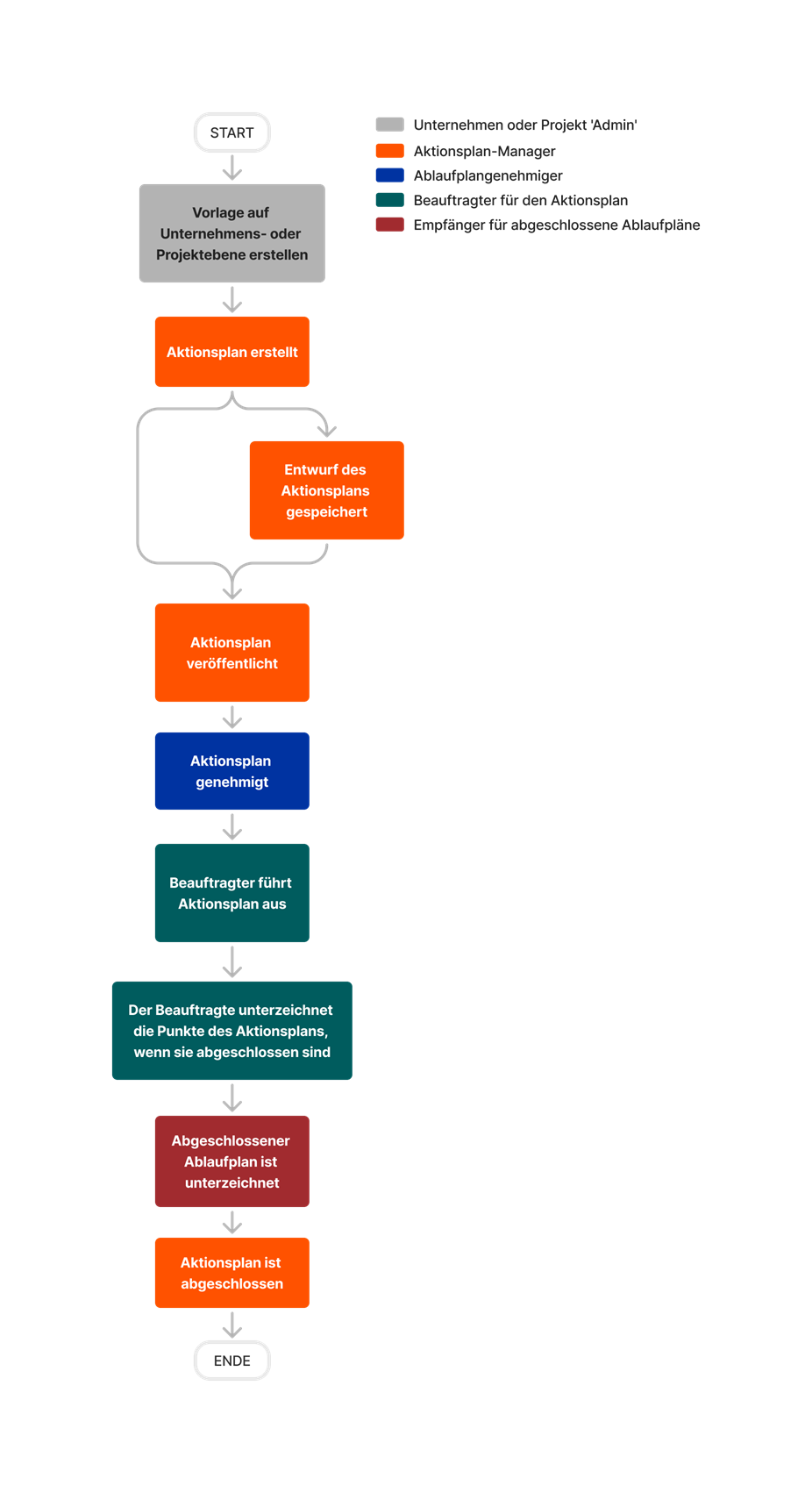
diagram_action-plans_tool-overview.png

diagram_action-plans_tool-overview_de-de.png

diagram_action-plans_tool-overview_en-au.png

diagram_action-plans_tool-overview_en-ca.png

diagram_action-plans_tool-overview_en-gb.png

diagram_action-plans_tool-overview_es-es.png

diagram_action-plans_tool-overview_es-la.png

diagram_action-plans_tool-overview_fr-ca.png

diagram_action-plans_tool-overview_fr-fr.png

diagram_action-plans_tool-overview_ja-jp.png

diagram_action-plans_tool-overview_pt-br.png

diagram_action-plans_tool-overview_zh-sg.png

diagram_action-plans_tool-overview.png

Learn which user permissions are required to take the described actions in this tool.

 重要

Some actions that impact this tool are done in other Procore tools. See the User Permissions Matrix for the full list of actions taken in all other tools.

権限

   The action is available on Procore's Web, iOS, and/or Android application. Click to view the article.

icon-mindtouch-table-check.png Users can take the action with this permission level.

icon-mindtouch-table-check.png Users can take this action with this permission level AND one or more additional requirements, like granular permissions.

プロジェクトのアクション プラン ツールではどのようなアクセス権限を利用できますか?

アクション なし 読み取り専用 標準 管理者

アクション プラン案件にレコードを追加

 ウェブ     iOS     Android


icon-mindtouch-table-check-gp.png

  • レコードを追加する
    又は
  • アクション プランを作成して編集する
icon-mindtouch-table-check-gp.png icon-mindtouch-table-check-gp.png また、それぞれのツールで案件を表示する権限も必要です。

実行するアクション プランを承認する

 ウェブ     iOS     Android


icon-mindtouch-table-check-gp.png

  • アクション プラン承認者として署名する
icon-mindtouch-table-check.png icon-mindtouch-table-check.png  

別のユーザーに代わって実行するアクション プランを承認する

 ウェブ     iOS     Android


icon-mindtouch-table-check-gp.png

  • 同じ会社内のユーザーのアクション プラン承認者として署名する

icon-mindtouch-table-check-gp.png

  • 同じ会社内のユーザーのアクション プラン承認者として署名する
icon-mindtouch-table-check.png  

アクション プランを作成する

ウェブ


icon-mindtouch-table-check-gp.png

  • アクション プランを作成して編集する

icon-mindtouch-table-check-gp.png

  • アクション プランを作成して編集する
icon-mindtouch-table-check.png

詳細権限により、ユーザーはレコードの追加、項目ステータスの編集、項目のメモの編集を行うこともできます。

アクション プランで連絡先を作成する

ウェブ


icon-mindtouch-table-check-gp.png

  • アクション プランを作成して編集する

icon-mindtouch-table-check-gp.png

  • アクション プランを作成して編集する

icon-mindtouch-table-check-gp.png

ユーザーには、「連絡先を作成する (利用可能な場合)」詳細権限を持つプロジェクトのディレクトリ ツールに対する「読み取り専用」レベル以上の権限も必要です。

プロジェクトレベルのアクション プラン テンプレートを作成して編集する

ウェブ


icon-mindtouch-table-check-gp.png

  • プロジェクト テンプレートを作成して編集する

icon-mindtouch-table-check-gp.png

  • プロジェクト テンプレートを作成して編集する
icon-mindtouch-table-check.png  

アクション プランを削除する

ウェブ


icon-mindtouch-table-check-gp.png

  • アクション プランを削除する

icon-mindtouch-table-check-gp.png

  • アクション プランを削除する
icon-mindtouch-table-check.png  

アイテムのメモを編集する

 ウェブ     iOS     Android


icon-mindtouch-table-check-gp.png

  • アクション プランの担当者として案件のメモを編集する
    又は
  • アクション プランを作成して編集する

icon-mindtouch-table-check-gp.png

  • アクション プランの担当者として案件のメモを編集する
    又は
  • アクション プランを作成して編集する
icon-mindtouch-table-check.png アクセス権限を持つユーザーは、案件の担当者であるか、アクション プランを作成した場合にのみ、このアクションを実行できます。

アクション プラン項目のステータスを編集する

 ウェブ     iOS     Android


icon-mindtouch-table-check-gp.png

  • アクション プランの担当者として案件のステータスを編集する
    又は
  • アクション プランを作成して編集する

icon-mindtouch-table-check-gp.png

  • アクション プランの担当者として案件のステータスを編集する
    又は
  • アクション プランを作成して編集する
icon-mindtouch-table-check.png アクセス権限を持つユーザーは、案件の担当者であるか、アクション プランを作成した場合にのみ、このアクションを実行できます。

アクション プランを編集する

ウェブ


icon-mindtouch-table-check-gp.png

  • アクション プランを作成して編集する

icon-mindtouch-table-check-gp.png

  • アクション プランを作成して編集する
icon-mindtouch-table-check.png 担当者を追加、編集、または置換するには、ユーザーはプロジェクト ディレクトリ内の「読み取り専用」以上の権限も持っている必要があります。

アクション プラン通知を構成する

ウェブ


icon-mindtouch-table-check-gp.png

  • 通知を編集する

icon-mindtouch-table-check-gp.png

  • 通知を編集する
icon-mindtouch-table-check.png  

アクション プランのエクスポート

ウェブ

  icon-mindtouch-table-check.png icon-mindtouch-table-check.png icon-mindtouch-table-check.png  

アクション プランを実行する

  ウェブ     iOS     Android

  icon-mindtouch-table-check-gp.png icon-mindtouch-table-check-gp.png icon-mindtouch-table-check.png

このアクションには、多くのサブアクションが含まれます。 次のアクションに必要な権限を参照してください。

  • 記録を追加する
  • 公開済みプランのレコードをリクエスト
  • アクション プラン項目の備考を編集する
  • アクション プラン項目のステータスを編集する
  • アクション プラン項目に署名する

自分に割り当てられた項目のアクション プラン項目に署名する

 ウェブ     iOS     Android


icon-mindtouch-table-check-gp.png

  • アクション プランの担当者として署名する
icon-mindtouch-table-check.png icon-mindtouch-table-check.png  

任意のユーザーのアクション プラン項目に署名する

 ウェブ     iOS     Android


icon-mindtouch-table-check-gp.png

  • 任意のユーザーのアクション プランの担当者として署名する
     

icon-mindtouch-table-check-gp.png

  • 任意のユーザーのアクション プランの担当者として署名する
icon-mindtouch-table-check.png  

同じ会社内のユーザーのアクション プラン項目に署名する

 ウェブ     iOS     Android


icon-mindtouch-table-check-gp.png

  • 同じ会社内のユーザーのアクション プランの担当者として署名する

icon-mindtouch-table-check-gp.png

  • 同じ会社内のユーザーのアクション プランの担当者として署名する
icon-mindtouch-table-check.png  

項目からレコードを削除する

 ウェブ     iOS     Android


icon-mindtouch-table-check-gp.png

  • 記録を削除する
icon-mindtouch-table-check.png icon-mindtouch-table-check.png


公開済みプランのレコードをリクエスト

 ウェブ     iOS     Android


icon-mindtouch-table-check-gp.png

  • 記録依頼を公開されたプランに担当者として追加する
icon-mindtouch-table-check.png icon-mindtouch-table-check.png アクセス権限を持つユーザーは、案件の担当者であるか、アクション プランを作成した場合にのみ、このアクションを実行できます。

アクション プランの検索とフィルタリング

 ウェブ     iOS     Android

  icon-mindtouch-table-check.png icon-mindtouch-table-check.png icon-mindtouch-table-check.png  

完了したアクション プランに自分として署名する

 ウェブ     iOS     Android


icon-mindtouch-table-check-gp.png

  • 完了したアクション プランの受領者として署名する
icon-mindtouch-table-check.png icon-mindtouch-table-check.png  

同じ会社内の別のユーザーの完了したアクション プランに署名する

 ウェブ     iOS     Android


icon-mindtouch-table-check-gp.png

  • 同じ会社内のユーザーの完了したアクション プランの受領者として署名する

icon-mindtouch-table-check-gp.png

  • 同じ会社内のユーザーの完了したアクション プランの受領者として署名する
icon-mindtouch-table-check.png  

アクション プランを表示

 ウェブ     iOS     Android

  icon-mindtouch-table-check.png icon-mindtouch-table-check.png icon-mindtouch-table-check.png  

以下は、プロジェクトのアクション プラン ツールに対する注目すべき変更点です。

最近の変更点

最新化されたアクション プラン エクスペリエンス (2025 年 03 月 20 日)

アクション プラン ツールのレイアウトとデザインが最新化され、より直感的になりました。機能に変更はありません。このツールの詳細については 、「アクション プラン」を参照してください。

参考資料 アクション プランの更新 (2024 年 09 月 03 日)

アクション プランを作成するとき、[参照] セクションに [文書を追加] と [Procore 項目を追加] の 2 つのアクション ボタンが表示されるようになりました。 この更新により、アクション プラン参照の整理が改善されると同時に、文書のストレージも増加できるようになります。 「 アクション プランを作成する」を参照してください。

アクション プランの新しいテンプレート (2024 年 01 月 29 日)

アクション プランを作成する際、Procore の新しいアクション プラン テンプレートを使用してプロセスを簡素化できます。 これらのテンプレートを使用すると、ゼロから始めるという管理上の煩わしさなしに行動できます。詳細については、 お知らせ をお読みください。

要求されたレコード ファイル セレクターの更新 (2024 年 1 月 16 日)

アクション プラン項目に対して要求された添付書類を追加する場合、写真、図面、フォームの Procore ツールから添付書類を追加できるようになりました。 さらに、写真が要求された場合に、Procore の写真ツールから直接写真を追加できるようになりました。 これらの更新により、Procore から直接添付書類や写真を追加する柔軟性がさらに高まります。 「アクション プラン案件にレコードを追加する」を参照してください。